On this page: Virtual Boy Switch Online Nintendo Classics FAQ
1. Can I use Labo VR goggles to play Virtual Boy games on Switch? 2. Doesn't it make your arms ache holding that thing to your face? 3. Could I get creative and jam my Switch 2 in my Labo VR goggles? 4. Can I play Virtual Boy games docked to the TV? 5. Can I play without the peripherals by just looking at one of the two images? 6. Can I play without the peripherals by crossing my eyes like I was doing a 'Magic Eye' picture? 7. Are there any adjustments you can make to the 3D effect? 8. What games are available now? 9. What's the best launch game of the bunch? Virtual Boy Switch Online Nintendo Classics FAQ
Can I use Labo VR goggles to play Virtual Boy games on Switch?
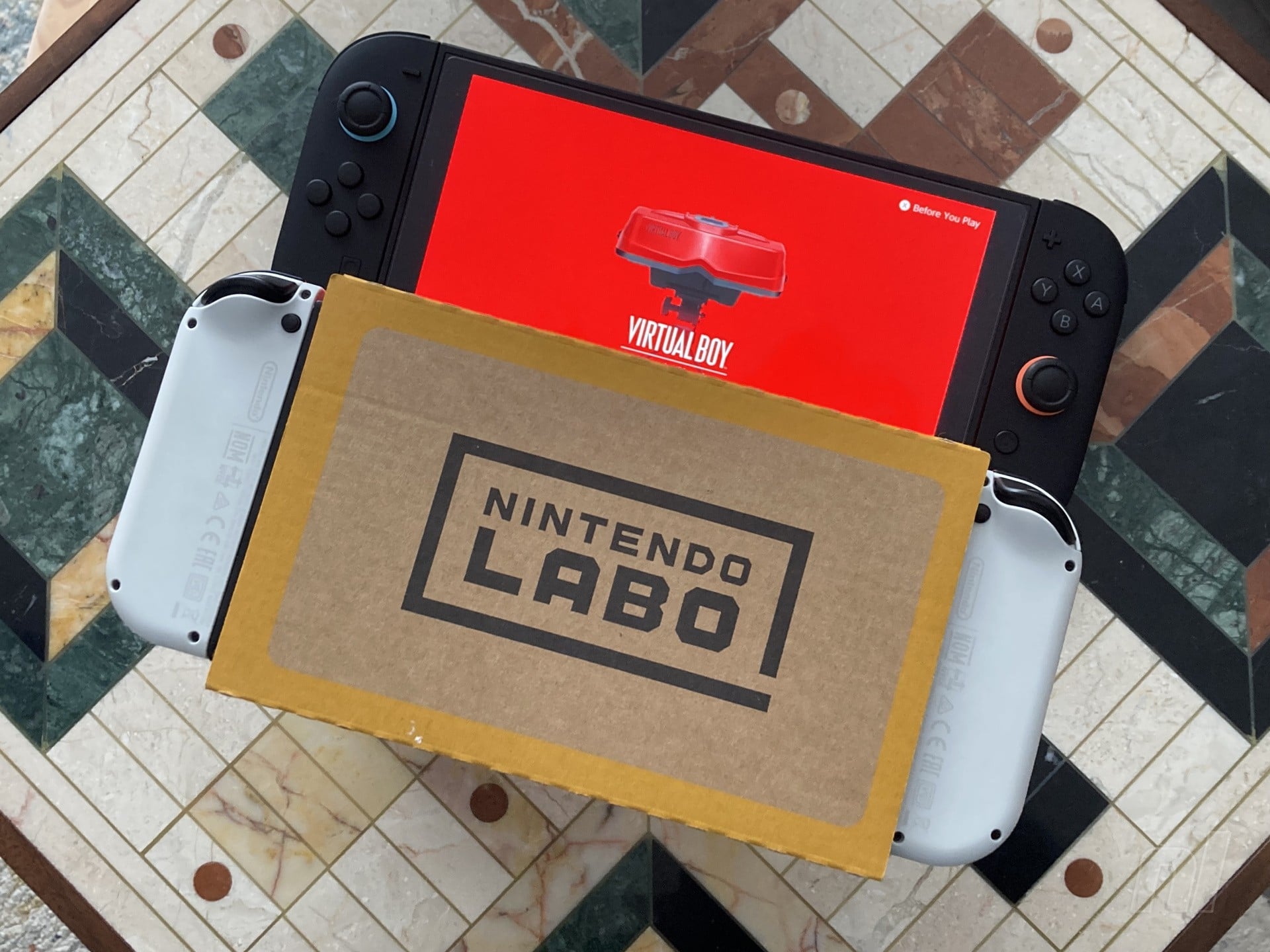
Yes! Contrary to Nintendo's official stance, Labo VR goggles work just fine, though with some caveats.
If you still have your Labo goggles, a Switch 1 or Switch OLED Model will absolutely fit inside and you can play the VB library using that peripheral. Switch 2, however, is too large for the cardboard without some major disassembly.
Nintendo may have walked back an employee's confirmation regarding official support — almost certainly because the Labo VR isn't widely available anymore and doesn't have the appropriate disclaimers attached in any case — but the console still fits and the software displays as you'd expect. Holding it to your face for extended periods isn't the most comfortable playing experience, but it works.
We'll report back soon with how this compares to the official Virtual Boy accessories.
Doesn't it make your arms ache holding that thing to your face?
A little bit — it's not ideal for long sessions, but neither is staring at a monochrome screen through cardboard goggles. For the brief play sessions you'll likely spend with it, it's fine.
There's always the option of cracking off the Joy-Con and creating a more comfortable setup with a pile of cushions or something, we suppose (or maybe investigating a third-party solution ).
Could I get creative and jam my Switch 2 in my Labo VR goggles?
Hey, if you want to crack out the sticky tape, cut up your Labo, or try adapting the goggles to fit your Switch 2, we imagine it would work. Technically , Labo VR was designed for the smaller screen of the regular, non-OLED Switch 1, so Nintendo probably wouldn't officially endorse the OLED being in it.
It's a suboptimal solution, but with some tweaking, we don't see any reason why it wouldn't work. Let us know if you're braver than us and have any success repurposing your existing goggles.
Can I play Virtual Boy games docked to the TV?
No, the Switch you're playing on will display a message saying it's handheld or nothing, unfortunately.
We get that it's designed with 3D in mind, but it feels odd to not have the option to even display the thing on your TV.
Can I play without the peripherals by just looking at one of the two images?
Yes, technically, that is possible. However...
Just be aware that even on Switch 2, where you can expand the size of the screens to 1.3x their default size (Switch 1 can't go above 1.0x), you're still looking at images approximately 28 x 45mm or 1.1 x 1.8 inches in size. It's real postage-stamp stuff, unfortunately.
Can I play without the peripherals by crossing my eyes like I was doing a 'Magic Eye' picture?
Hmm, you can, but the problem with this is that the screens are minuscule . It's not comfortable, and it’s fairly difficult to perceive the 3D effect properly at this size.
You do you, but we wouldn't really advise it for long periods.
Are there any adjustments you can make to the 3D effect?
You can adjust the interpupillary distance (IPD, meaning the distance between the centre of your pupils) from -20 to +20. This shifts the two images displayed closer or further apart, depending on your preference.
You can also change the size of the image, although anything below 1.0x on Switch 1 destroys the resolution and only Switch 2 can make the image larger than 1.0x (it goes to 1.3x default size, although as mentioned previously, the resulting images are still tiny when viewed without the goggles).
You can make these adjustments at any time in-game by holding down the right stick.
At some point "later this year" , Nintendo will add the ability to change the hue of the rendered visuals, so you'll be able to switch the default red to other colours.
What games are available now?
You can find the full list of announced VB games in our NSO retro games guide , but here are the seven playable as of 17th Feb 2026:
What's the best launch game of the bunch?
Wario Land, hands down, although we'll be asking for your opinions on the launch batch very soon. Keep an eye out for our hardware review, too, where we'll let you know if we think the new Switch-friendly facsimile is worth the asking price.