 by
by 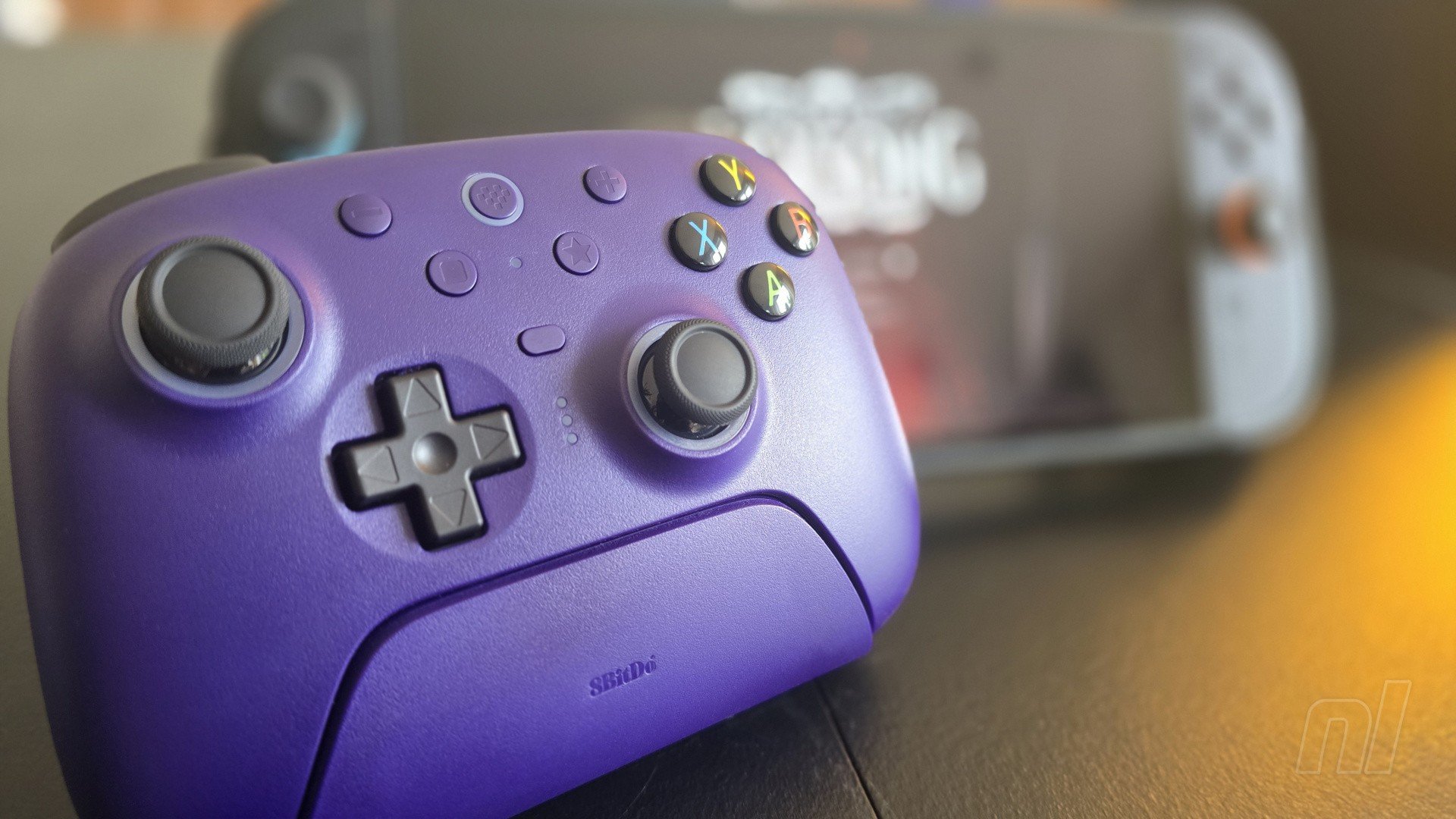
Note. Before we begin, it's worth clarifying that the controller reviewed here is the Ultimate 2 Wireless Controller, featuring an Xbox-style button layout and originally designed for Windows and Android. However, there is also an Ultimate 2 Bluetooth variant, which is more readily out-of-the-box compatible with Switch and features the standard face button arrangement for Nintendo's system.
A compatibility update for older 8BitDo controllers enables Switch (2) functionality as described below. Head to 8BitDo's website for the relevant instructions and downloads.
We've been putting a procession of 8BitDo controllers through the review process since Switch 2 launched. I've covered their excellent Pro 3 controller, whilst Ollie has been all over the new Arcade Stick for Switch + Switch 2 and the Ultimate 2C, which is the budget-friendly version of what I'm taking a look at today - the 8BitDo Ultimate 2 Wireless.
First and foremost, for anyone who doesn't gel with the shape of the Pro 3 controller, what you've got here is one that suits those lovely, soft, Xbox-controller-shaped paws you've developed over the years. I know for some this can be a dealbreaker, especially with how the thumbsticks sit horizontally aligned on the Pro 3, so if that has been holding you back, this may be the pad you're after. Things under the hood aren't showing a lot of difference otherwise.
Indeed, my main positive talking points remain much the same as with the Pro 3. 8BitDo has put a lot of emphasis on having the latest tech in its gear recently, and here we once again get all the big 2025 buzzwords from the exciting world of controllers. TMR sticks make the cut — a feature which still usually sees the cost of a controller rocket — and they are a joy, giving you the smoothest sticks around with all of that fancy magnetic magic that goes into making them free from the bane of stick-drift.
For the triggers, we're looking at snazzy Hall Effect magnetic jobs, too. So you've got all the quality included with regard to sticks and triggers, exactly the same as with the Pro 3, which makes for a solid core. The d-pad sticks to the same style as the Pro 3, too, chunky and responsive and sitting out nicely as it clicks through all of its input points.
Sticking with similarities between this and other 8BitDo products, the number one drawback is, of course, that these controllers don't have the ability to wake the Switch 2 up. There have been some rumblings that they're working on a solution, and the pad received an update to make it compatible with Switch 2, so this is something we could see down the line, as some manufacturers have already managed it. However, for now, I feel like I'm capping review scores for pads that make me walk to my console to an 8 out of 10. Not out of laziness, you understand; it's a function that simply should be there.
If you can make peace with this — if you can somehow work around the pain of turning the console on "manual-style" — well, there isn't really much more for me to follow up with in terms of negatives. If I had to get picky, NFC support isn't there (something that doesn't interest me at all, but it will do some), and I feel as though the extra programmable 'L4' and 'R4' shoulder buttons up top make the pad a tiny little bit clicky and less solid in form than it could be.
It doesn't feel bad at all. In fact, it feels much like the official Pro Controller 2 from Nintendo, and even beats it out in having nice grippy textures on the back of the pad, but they can occasionally feel a bit loose in comparison to the rest of the inputs. You do get a total of four programmable buttons out of this, mind, with two paddles on the grips, so all in all, a very minor issue.
The Hall Effect triggers can be switched between regular and macro-switch modes and there's some snazzy RGB lighting in the rather unfortunately named "RGB Fire Rings" around the bases of the sticks. I'm not a huge RGB guy, as hard as it may be to believe, but these are fine in my opinion - they give off a warming glow and can be switched on and off and cycled through colours and modes via the 8BitDo software available from their site.
Now, speaking of this software, you need to update the controller, should you pick one up, in order to have it work on Switch 2, so be aware of this and know that you'll need a laptop or whatnot to connect for a small download. Once in the 8BitDo app, you can also then set your lighting to whatever colour you want, switch it off, have it follow and change colours to your touch, and so on.
When both your dongle and controller have updated via the app, you can then connect to the Switch 2, just make sure to hold down Y and the power button when powering it up and you should be connected.
This controller also comes with a big brutalist charging dock, which I have to say I kinda love. Just like the Pro 3's base, here you find your all-important USB-C receiver tucked away in a compartment, and the dock has the same slick little bar of light running along its underside, which is a lovely detail in a darkened room.
Before I wrap up, and with regard to battery life, I drained my controller in about 14 hours, and I believe I could have got a bit more out of it if I had turned off the RGB. So, word of warning, it's not the very best battery out there, and those lights make it ever-so-slightly worse.
Otherwise, in terms of specs and price point ($59.99 / £49.99), features, comfort and design, it's all gravy, even if the budget 2C wins in the value department. Yes, it could be easier to update, there's a tiny little bit of clickiness out of the 'L4' and 'R4' buttons, and the battery is weaker than I'd like, but overall this is still a premium-feeling pad, stuffed full of the latest wizardry, at a reasonable price compared to some competitors.
Please note that some external links on this page are affiliate links, which means if you click them and make a purchase we may receive a small percentage of the sale. Please read our FTC Disclosure for more information.
Thanks to 8BitDo for supplying the sample used in this review. The 8BitDo Ultimate 2 Wireless Controller is already out there and available to buy.


Comments 51
Hey man, @ PJ O'Reilly, There is something really important to mention here and please correct me If I'm wrong...
8bit do names are a Sh**** show. The controller you posted pictures of and linked on amazon at the end of the article is the 8BitDo Ultimate 2 wireless controller ( FOCUS ON WIRELESS which is the name of this model) AND it should be the 8BitDo Ultimate 2 BLUETOOTH controller which is the one fully supported by the switch 2 ( switch buttons layout and Botton LED and a working screenshot button)
Notice that your article title mentions the bluetooth model and your photos are of the wireless model and don't get me wrong I know both controllers are wireless and bluetooth but they are MODEL names in this case. Wireless being a controller and bluetooth being another one.
The Ultimate 2 Wireless has the Xbox button layout AND although it works on the Nintendo Switch 1 and 2 it only worked with the dongle connected to the dock and in 2.4ghz mode (switch on the back) PLUS the screenshot button does not work. It's a terrible controller for the switch.
I don't know if you want to address that, but it can cause a lot of hassle.
For 60 dollars I would rather just buy the official Pro Controller for the Switch 1
I would like to add for all the focus on being able to wake the Switch 2 or not, that this controller can’t wake the Steamdeck either (which is what I bought mine to play on).
I have the first gen ultimate, and while great... having to press a button and wiggle waggle jostle and shake just to wake (Switch 1), isn't fun.
Are the sticks smoother than the Switch 2 Pro Controller? I don't think it can get smoother than that!
They actually did add wake up capability for switch 2 to their ultimate 2 bluetooth controllers about a week ago. They have an unlisted video on their youtube channel showing how to do it.
Just get an 8bitdo Ultimate 2c, it's only $30 ($20 if you're fine with wireless) and for the price is a fantastic value. I've never used this regular Ultimate 2 before, but based on this review it sounds like its a good controller but not worth the higher price tag compared to the Ultimate 2c.
Please for christs sake, how can you do a Controller Review on Switch 2 and omitting the info if the analogue triggers are recognized by the console? That would be really important to some of us.
Any chance to check and tell us?
Thank you!
@T_zelda Are you sure you've updated the dongle and the controller? Because this one is working fine with my Switch 2 once I updated it via the app.
@PJOReilly
Wow, OK, I'm wrong then. I updated both after I read the article. Maybe the firmware didn't take. I'll try again.
@T_zelda No its cool, I know its confusing as he'll. The only other thing I can think is, have you remembered to hold down Y and power on with the power button, this will connect to to the console.
@SirVick Ah! I see. All fixed. My gosh, I panicked there 😅
The controller in the pics is the wirless one, but it also now works on Switch 2 since the update a few weeks back. Update the dongle and controller in the app on a PC or laptop then connect by holding Y and the power button. Controller has been perfect for me so far.
Honestly like the look of this but I can't readily buy a controller that doesn't wake the console as crazy and first-world conundrum as that sounds. I've got the original pro and it's still good so I'd only want to upgrade for that functionality. 8BitDo take note please
Enjoying all these reviews, and I went 3rd party on all controllers with Switch 1, but done a complete U-turn having bought the Switch 2 Pro Controller. It just feels absolutely perfect to use, and I am even spending more time in TV mode this gen when I usually prefer handheld due to how good it is.
@PJOReilly Yes indeed, but the Bluetooth one is the one to advise people with Nintendo Switch in mind to buy as it'll work wirelessly via bluetooth, it has the right button layout and the capture button works.
The wireless version not only needs the dongle, you also need to set the switch to wired controller mode and the capture button does not work.
I'm just really trying to help people not go through the very unpleasant set of caveats that the wireless version has when using it on the switch.
The ultimate 2 wireless is a great controller if you play on PC mostly and want the option of plying on the switch, not as a main switch controller. I mean the Ultimate 2 bluetooth is marketed as and has full Switch support for the same price.
Thank you man!
@SirVick Maybe they'll send me one of those ! 😅
@PJOReilly Oh, boy. Sorry. gotcha! lol
@PJOReilly
Haha, I just mucked about for a few minutes again trying to connect it and found someone online mentioning to hold the (Y) button when turning an 8BitDo controller on. It worked! Came back here and you have mentioned it! It wasn't in my instructions as its a new feature in the firmware. I was sure you must have photographed the wrong controller. I was wrong.
What fun we have all had in the end!
My review is that this is a great controller. It has a clicky D-Pad, but I think I prefer those. The (A) button is printed on the bottom button, but you can get used to it as its still on the right in game. It has no wake button, but I do hope they can add it in later firmware. I also have the £25 8BitDo Ultimate 2C Bluetooth Controller which is half the price that you mention at the start of the article that I'll continue to use for Switch 2 and 1. This one I'll still use for Steam.
@T_zelda Hey! No worries! I'm glad it's working now 😌
I use an xbox series controller via converter.
@Scollurio Why are the analog triggers relevant? Neither the Switch 1 or Switch 2 had analog triggers, meaning no game was made with analog trigger support. Why would Nintendo support features its console or developers can't take advantage of?
The drawbacks are a typical reason why I avoid these 3'rd party controllers. I want everything to simply work smoothly.
at the risk of sounding ableist, I keep my controllers next to my console, and I walk up there when I want to play videogames.
@SirVick why terrible ? It's the same as the bluetooth one but with more tech.
Maybe I'm just old, but I have a hard time seeing how a 14-hour battery life is a ding. I think people are just spoiled by 20+ hour battery life estimates at this point.
Like, just plug it in after you're done playing. It isn't difficult. Are you playing for 14 hours straight or what?
In a world where controllers are differentiated by things like latency, polling rate, stick drift, TMR vs Hall sticks, trigger stops, back paddles, dongles, d-pad styles (clicky vs mushy), battery life, swappable face buttons layouts- all things that affect gameplay, the thing you will be doing 99.99% of the time with a controller…
I have a hard time understanding why the ability to wake up the Switch, something you will be doing > 0.01% of the time while holding a controller, continues to weigh so heavily in people’s consideration and ranking of controller.
Someone please help me understand. 😅
I have the controller and it’s fantastic value for this price. Sticks are great, ABXY buttons feel less weighty (more Xbox-y) than S1Pro but that’s fine. The only thing that I struggle with is the rumble which is way too strong! Tried it with Bananza and it’s unplayable because it rumbles hard with every step, all the time. Im sure the devs tuned this game very carefully, but with this controller for this game it’s no fun. I wish there was a way to adjust this. However, it’s still a great product.
I use the GameCube pad to wake the console then I switch to the pro pad to play, it’s a right git to do
I have never been one to buy 3rd party controllers, but after having two Nintendo Switch Pro controllers become unusable I got the original Ultimate controller and it became the goto controller in the house. For me the lack of HD rumble was the only negative.
With costco’s deal on the Switch 2 Pro controller and all the glowing reviews, I broke down and got one. That is now the goto controller (meaning I don’t get to use it for multiplayer sessions), but I’m not willing to put more money into Nintendo made controllers until they prove their durability. Besides I now get to use my ultimate controller for multiplayer again. I’m hoping it will get an update to support the GL, GR button functionality on Switch 2 as using the app can be cumbersome.
@MrMcGeeIn3D gamecube Games do. Grid Autosport did. Switch 1 Situation was garbage back then and I want to know if this time around things are different. Plenty of racing games benefit from that.
@The_Nintendo_Pedant itll never catch on
Tis an annoyance that it can't wake the console like earlier iterations did with the OG Switch (I did enjoy shaking the controller to wake the console up heh)
Thanks for the review, again I'm not personally interested in such controllers considering all the features they're missing (I'll just get a Switch 2 Pro Controller at some point), but it's still interesting to learn about these and of course I also hope that those going for this will enjoy it!
Bought the Ultimate 2 (Bluetooth) for the 1st time because I absolutely love the SN30 pro+ and Pro2 Controllers (not only for having the best D-Pads I've ever played with) and wanted to try something different.
Two things I didn't read in the article above:
@The_Nintendo_Pedant How dare you suggest I use my legs for anything but standing and sitting?! The nerve! 😋
@Maxrunner It's less compatible with the switch and it has the same tech as the Ultimate 2 Bluetooth.
understand that "bluetooth" and "Wireless" are model names that 8bitdo use. Both controllers are wireless and bluetooth.
The "wireless" is not compatible with the switch (1 or 2) via bluetooth. It needs a dongle connected to the dock and a setting on the switch to use "wired connection for the pro controller" turned on. Which limits you from using a second pro controller via standard bluetooth.AND the capture button does not work.
SO, it's not same.
Bluetooth model works as intended, via bluetooth, no extra settings, capture button works and it works on PC as well.
Call me old fashioned but my controllers live in a drawer under the TV, the Switch 2 also sits under the TV, I have no trouble switching the Switch 2 on while I'm up off my ass getting a controller, probably changing the game in the console at the same time.
@SirVick i think you can use the bluetooth mode in the controller if im not mistaken. using the 2.4ghz even the gyro works as intended. i've not tried the capture button. Although if you're using the wired mode with the included dongle makes sense it would only work in docked mode. Also this controller is 20€ less on amazon than the other version.
Also it has the 1000hz when using on pc o think.
@Maxrunner Also apparentely you can map the snapshot key to the start button for example.
@Maxrunner It's a great controller as a secondary controller for the switch and a primary for the PC, no doubt.
It does not work via bluetooth on switch. I had to return mine 2 months ago because I made the mistake of thinking just the button layout was different.
about mapping, you can do it. But tell me which games are you willing to give up a working button to assign the screenshot button? I have tried and there is always compromises.
It's not a bad controller, but even for 20 less, it's not worth it as your MAIN controller on the switch. IMO of course.
thanks for replying.
@Abeedo
Hello. How do I get the 8bitdo Ultimate 2 Bluetooth controller to Wake Switch 2? I updated both the PC Software, as well as the Controller itself. I was unable to find that youtube vid that explains how to do it...
@OmegaX83 https://youtu.be/kLT-fUVxsBU
This shows you how to do it.
@SirVick yeah, seems there's some issue mapping the analog triggers to the pedals on switch mode. it ends up mixing both LT/RT into each pedal...probably a firmware bug. Dont know if the beta firmware might fix these.
Also i think if you have the adapter 2 it can connect in bluetooth mode but i dont know if you loose anything...
@Scollurio Ah, you're completely right. I didn't take GameCube compatibility into consideration. Nintendo probably doesn't include support for analog triggers because they want to shill their own GameCube controller.
@MrMcGeeIn3D Nintendo ain’t that family friendly these days anymore. More and more corporate.
every time theres a "cant wake the switch 2 console" in the CONS section, it should be Nintendo that loses a point somewhere, somehow. ludicrous to deduct points from this product because of Nintendo's greed.
OTOH, why is this particular controller being reviewed here, when its obviously been purposely designed for steam, pc, xbox type applications? it doesnt even work with swotch 2 out of the box 😂 😂 it makes no sense at all. this controller got absolutely robbed in this review for no reason. this one should be on Time Extension where it might have been appreciated for what it actually is. (🙄)
(PS - no mention of the controllers absolutely coolest feature: switchable triggers that feel PHENOMENAL in both digital and analog modes. you can even make one digital and one analog 😱 and zero mention of it made.}
@Scollurio
i got a Steam Deck last week and everything "just works," and if i can dream up literally anything to try that usually "just works," too.
i havent been feeling Nintendo's first party games since roughly odyssey so there are pretty much zero downsides.
the analogue triggers and bumpers on Deck are DIVINE, incidentally. SO glad to have em back in my life ❤️
@The_Nintendo_Pedant I am eying that new Legion Go thing, I've heard it will run SteamOS officially too?
But yeah, eventually we'll all end up "on deck"
@Scollurio
i cant speak to any other "handheld pc" directly, but i avoid Windows as much as any other Microsoft product, personally. Windows on a handheld sounds like battery-powered Hell to me lol.
I get that it can run steam, but even as a Nintendo ex-pat, im still inclined to go with the "first party option," hence the Deck. Old habits die hard! 😂✌️
FWIW, just taking this controller off the dock wakes my Steamdeck instantly 😂😂😂
(but so does my Logitech bluetooth keyboard, so. 😌)
there's something about using a controller for the purpose for which it was designed. who knew? 👍
BTW Steam OS recognizes this controller specifically, shows the 8bd "heart" glyph on screen for "home" commands, represents the controller graphically in Steam Input, and allows mapping of specific functions to the "extra" buttons, not just clones of face buttons.
TLDR: this controller is an EASY 10/10 on steam. 👍👍 no complaints and I love to find and single out problems, y'all.
@The_Nintendo_Pedant Nothing to disagree with here!
Show Comments
Leave A Comment
Hold on there, you need to login to post a comment...