
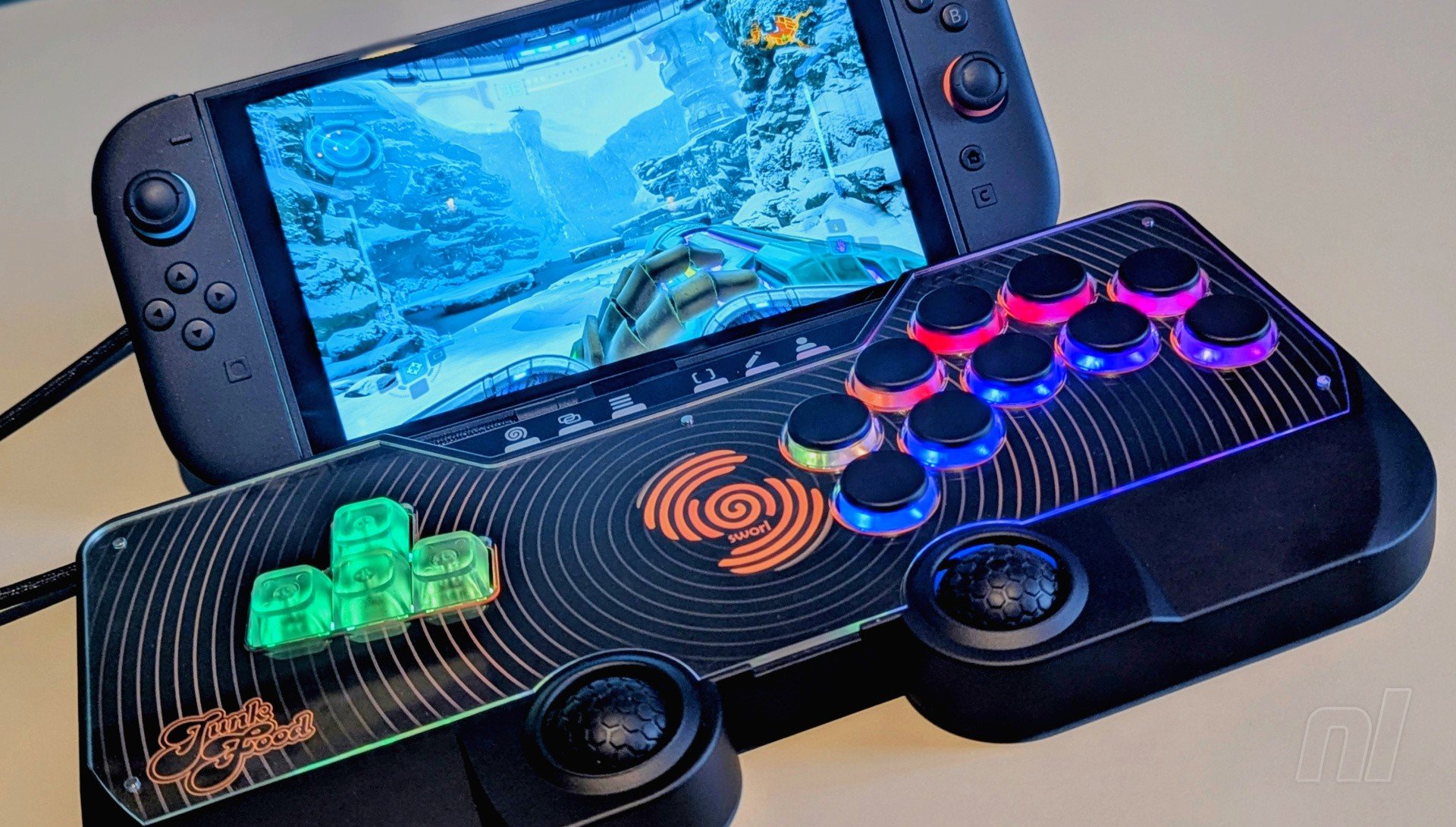
Junkfood Arcades has already made a name for itself with the Snack Box Micro, a remarkably compact leverless arcade controller that combines style and function. It’s frankly one of the best options out there for fight fans.
So where do you go from there? Well, Junkfood has created one of the most unique and ambitious wired controllers I’ve ever seen with the SWORL, which looks to take the leverless arcade experience well beyond the fighting genre.
What immediately sets it apart is the inclusion of two ‘thumb domes’ which essentially act like two enlarged analogue sticks. So with the combination of these, a WASD-style D-pad, and 10 face buttons, you can use the SWORL for everything from Super Smash Bros. Ultimate to Cyberpunk 2077. And the best part? It actually works really well, albeit with one key caveat.
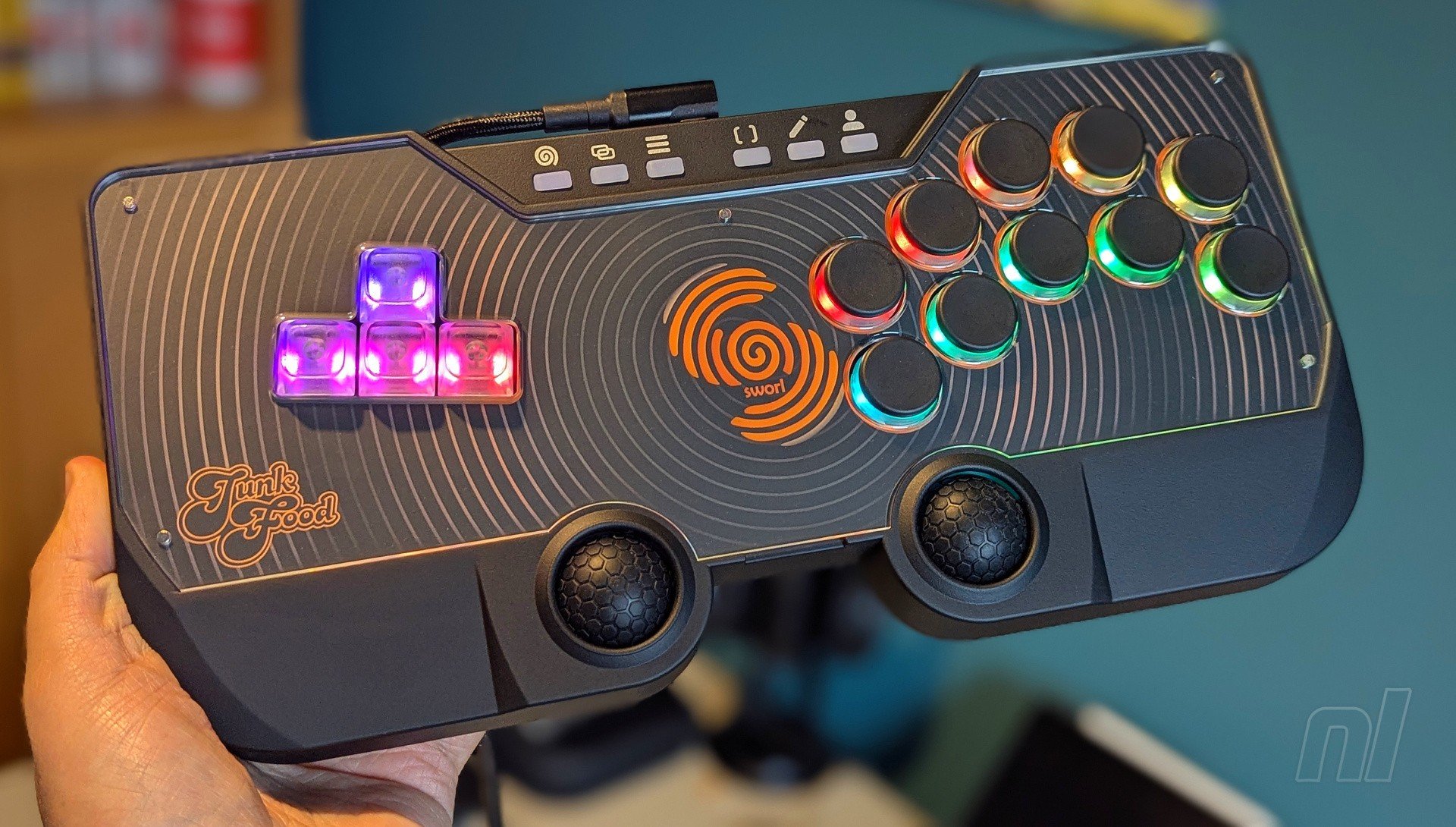
Aesthetically, the SWORL is already quite different from your average rectangular arcade controller. Though there are some gentle curves around the outside, this thing has a whole bunch of sharp, industrial angles going on, giving it a distinct retro feel.
The plastic body is completely black, though like the Hautepad C16, you can swap out the art inlay by removing the magnetic acrylic cover on top. No additional art is included here, so you’d have to source your own, and I’d highly recommend doing so because the stock design just ain’t it – the SWORL logo in the centre is cool, but the rest is pretty bland. Additionally, coloured keycaps can be bought directly from Junkfood if you want to add a bit more flair to the switches.
Naturally, turning the device on reveals a bunch of RGB lighting around the WASD switches and face buttons, and the SWORL really comes to life at this point. The range of colours and patterns they produce is mesmerising. When pressing the buttons, the accompanying light will turn green before fading into red – it’s a pretty cool effect, though I wish more were added around the thumb domes.
Of course, this is merely the default setting. By connecting the SWORL to the Junkfood Arcades web configurator (which is very easy), you can completely customise the lighting to your liking. A range of different patterns is available, so you can either stick to just one or disable them completely.
Elsewhere, a row of function buttons can be found on the top of the device, and these too light up when pressed. The labelling is a bit confusing at first, but from left to right, you’ve got Home, Select, Start, Capture, Edit, and Profile.
Over on the back, the entire surface is covered with a soft, non-slip fabric with the logo engraved in the centre. It’s lovely stuff, and it keeps things absolutely rock solid on smooth surfaces. If you want to play on your lap, you absolutely can – weighing in at just over 900g, the controller has a fair heft to it when holding it in your hands, but otherwise feels comfortable when resting on your lap.
You get a really high-quality carry case with the controller. Apparently valued at about $20, this is just as useful as any carry case you might get for the Switch 2 itself, with a hard-wearing exterior, a soft ‘blanket’ on the inside to lay over the device itself, and a mesh pocket to store the braided USB cable.
Connecting the controller to the Switch or Switch 2 is, for the most part, a breeze. The included cable is USB-A to USB-C and so works immediately in docked mode. For handheld mode, either an adapter or a separate USB-C to USB-C cable will be required, and considering the placement of the USB-C slot on the original Switch's bottom edge, docked mode may be the only viable option here - unless you want to lay the console flat or use a separate stand that accommodates the cable.
Otherwise, it's simply a case of consulting the instructions and holding down a specific button when plugging the controller in to enable the correct console emulation. Once you've done this for the first time, you won't need to bother with it again.
Looking at the controller's button layout, you’ve got the WASD switches on the left, the action switches on the right, and the thumb domes below. Respectively, these represent your D-pad, face/shoulder buttons, and analogue sticks. The default layout of the action switches is in line with more traditional fight pads, albeit with two extra switches mapped to ‘L3’ and ‘R3’.
Otherwise, when combined with the WASD switches, the SWORL is immediately viable as a controller for games like Street Fighter 6, Melty Blood, or really any fighting game on the Switch 1 and/or 2. If you’re used to this setup already, you’ll feel right at home, and it feels just as good as competitors like the Mixbox or Hautepad X.
The buttons don't provide the same 'clicky' feedback as the 8Bitdo Arcade Controller, but the MX switches provide good travel before coming to a hard stop. There's very little wobble, and the input lag is kept to an absolute minimum thanks to the wired setup.
For those hoping for a wireless connection, this is also supposedly on the way. Junkfood says that the controller is "prepped" for wireless compatibility, with an official dongle currently in the works. I'll definitely be keeping a close eye on this – provided the input lag remains minimal, this will open up its appeal greatly.
But the SWORL is more ambitious than that, and with the thumb domes (which, yes, are Hall Effect), you can theoretically use the controller with pretty much any game – provided there’s no reliance on gyro controls, of course. As for the shape and feel, they’re surprisingly comfortable. The way your hands sit means the side of your thumbs will be doing most of the work, and while that may sound a bit iffy on paper, it works really well.
Going back to the configuration tool, if you feel like maybe your thumbs are slipping a bit from pushing the domes around, you can increase the sensitivity to minimise the movement required. So this combined with the grippy, rubberised texture of the domes should ensure that your thumbs remain locked in place.
So in practice, your thumbs do all the movement-based stuff, while your left fingers control the D-pad and your right handles all the face buttons.
Does it work well for every game? Well, no – at least not at first. As per Junkfood’s guidance, games that rely heavily on shoulder button inputs, like Dark Souls, won’t feel particularly comfortable with the default layout, because you’re going to be constantly shifting from one row of buttons to the other to swap between light and heavy attacks. Again, this is where the configuration tool comes in, and you can essentially remap the button layout to whatever you like, swapping between profiles depending on what game you’re playing.
Do you really want to be faffing around with remapping buttons every time you want to try out a new game? Maybe not, it depends on how much patience you've got. If you’re keen to just plug in and play, there's only a finite number of games that actually feel comfortable with the SWORL's default layout.
Based on my experience, games like Metroid Prime Remastered, Pokemon Scarlet, and Story of Seasons: Grand Bazaar all work wonderfully right off the bat, because none of them necessarily rely on lightning-fast reflexes. If you want to dive into something like Bayonetta 3, on the other hand, you definitely can, but consider remapping the layout.
Once you do nail down the perfect layout, then my goodness, is this comfortable. Essentially, your hands are kind of locked in a neutral position, so you're not gripping anything or curving your fingers around unnaturally. The only thing I'd say to potentially make it even better is that the thumb domes should really be angled inwards slightly, so your thumbs aren't quite so high up when moving them about.
In terms of price, you're looking at $175 for the SWORL Basic, which covers PC and Switch/2 compatibility. For those who wish to use it across a wider range of platforms, the Sworl Multiconsole at $225 might be your best bet. This one comes with a built-in Brook chip to enable immediate compatibility with both the PS5 and Xbox Series X.
Conclusion
The SWORL is a remarkable little device. Although you can achieve something similar with the Hautepad X's modular setup, the layout here is incredibly unique and ambitious, taking the humble arcade controller beyond the fighting genre to cater for a much wider selection of games.
My biggest gripe is that the default layout simply won't be suitable with some types of games, so it's often necessary to use the configurator tool to remap the inputs accordingly. Naturally, this isn't ideal if you're just after something you can plug in and play, but for those with the patience to do so, you'll find the SWORL to be an incredibly comfortable controller.
Please note that some external links on this page are affiliate links, which means if you click them and make a purchase we may receive a small percentage of the sale. Please read our FTC Disclosure for more information.
Thanks to Junkfood Arcades for providing the sample used in this review.


Comments 13
Very nice. I have no idea if I could adjust to a controller like this though, so it would be a pretty big gamble at that price.
Thanks for the review, still not interested in such a controller personally, but it's really cool to hear about these in general (and even more so in this specific case considering its unique design, starting with but not limited to the thumb domes) - hope those going for it will enjoy it!
Wonder if there’s a version with the directionals on the right. I emulate a hell of a lot, and I got really good using the cursor keys - never got used to WASD.
Even back in the day on coin-ops I played cross-handed, going righty with the stick and lefty with the buttons. Just felt more natural to me, and I’m right handed.
@Whirlwound
Same here! I have an 8bitdo stick custom modded by myself with Sanwa stick and buttons but I'm still rarely use it for this very reason. I would love to have the stick on the right.
This SWORL gadget is intriguing, anyway. Unfortunately they don't ship it to Poland.
cool concept!
otoh imo 8 identical arcade buttons is already too many 😆 id much prefer a classic 6 button layout with the other buttons cleverly laid out elsewhere.
in general im very interested in "alternative" type controllers, and this one is very interesting indeed! thanks for review 👍
Would be cool if those domes were trackballs instead of analog sticks but still looks cool
I have never seen this kind of button layout in an arcade. The vast majority of arcade machines have joysticks.
I love all these unique controllers we are getting now. I bought the 8bitdo leverless and have had fun trying it out on a few games. I’ve replayed some of Celeste with it and played bits of Silksong with it (beat Last Judge with it, but it may have caused me to take more tries than I otherwise would have). I’ve switched back to a pro controller for Silksong, but I may try it again with the leverless. I also bought Street Fighter 6 while it was on sale because I have been curious about getting in to fighting games. SF6 has nice tutorials so I’ve had fun with it in spite of the fact that I am new to it and therefore bad at it.
It is neat to see a controller that adds analog as an option. I could see this being good for games like Hades or TMNT: Splintered Fate where it might be nice to use separate fingers for right hand inputs while still having analog control. That said, I am not ready to splurge on another controller right now.
@Moistnado It's not supposed to mimic the arcade. These leverless controls are popular for fighting games as they allow for guaranteed move completion if you do the required action properly, where dpad and joystick are harder to enter in an exact response 100% of the time.
Ooh that looks fancy! Thanks for the pros and cons
I’ve been playing the multi console SWORL since the second week of June. Works great with Switch 1/2, PS5, and my Steam Deck, haven’t tried it on anything else. I love it, after some adjusting to it, the SWORL feels right at home. Especially if you play on leverless fight controllers. The only thing I am still waiting for is an update on the Hall domes to click in for L3, and R3. You can click em in, but nothing happens yet. So you are forced to use a face button for those two, imo they should totally give you the option. Bring the update! Loving the SWORL JFA! Keep it up!
@w1p3out they should think about the name "Arcade Controller" I guess?
That looks really fun!
Show Comments
Leave A Comment
Hold on there, you need to login to post a comment...