
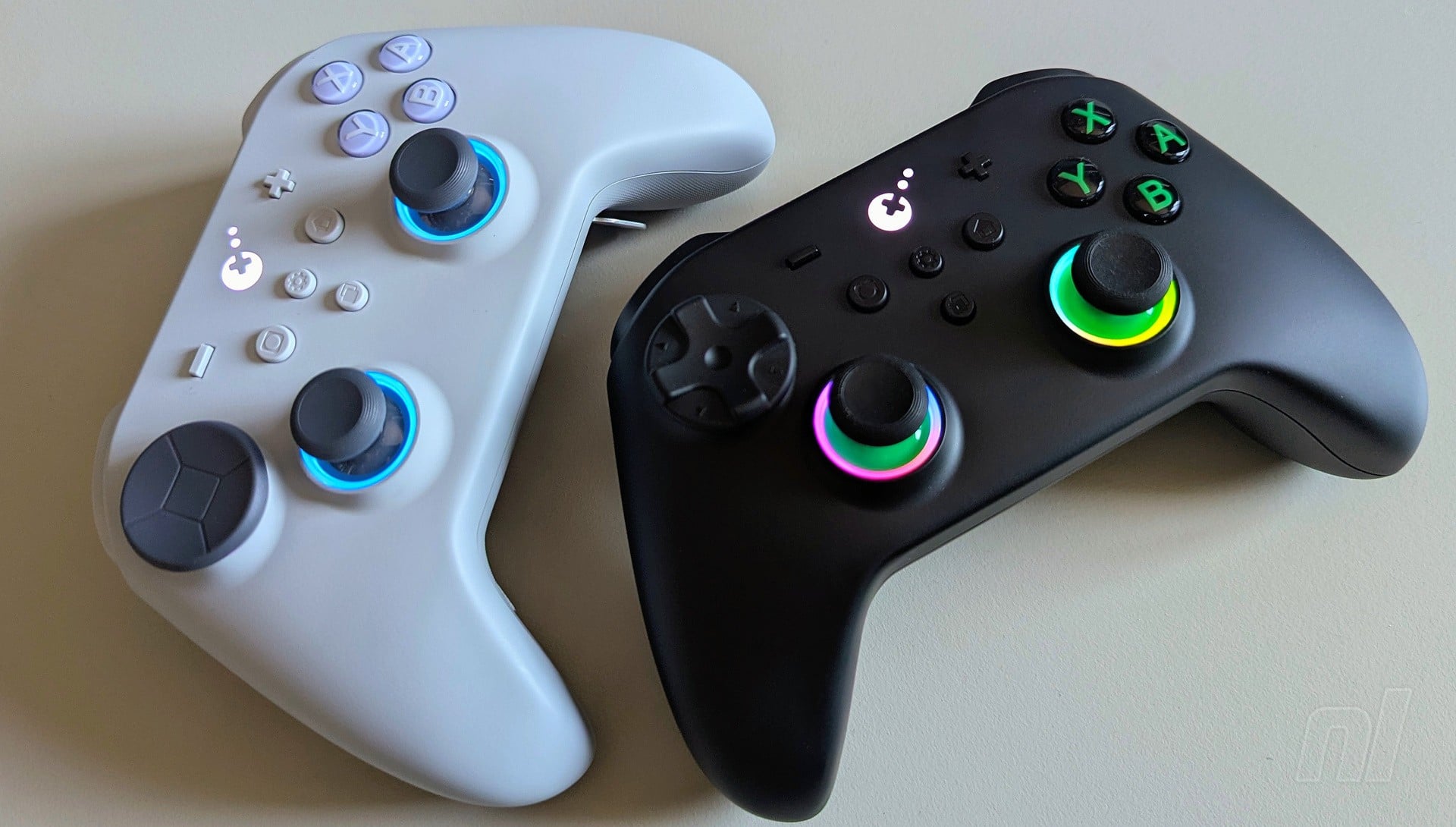
There have been some strong third-party controllers for the Switch 2 so far, with 8BitDo’s Pro 3 proving to be particularly compelling with its SNES-inspired design, TMR stick tech, and tactile (albeit noisy) D-pad. It was, in my opinion, the best alternative if you weren’t keen on splashing out on Nintendo’s own Pro Controller.
Until now, that is. Gulikit made headlines in 2025 by introducing the first third-party controller with wake-up support for Switch 2. But while the Elves 2 certainly boasts a unique design, it's ultimately lacking in other areas and looks somewhat ‘cheap’ compared to other models.
Subscribe to Nintendo Life on YouTube845k
With the TT Pro / TT Max pads, however, Gulikit has created its best controllers yet at $59.99 / £59.99 and $69.99 / $69.99 respectively; two that, in my opinion, just edge out 8BitDo’s Pro 3 as the strongest third-party offering for Switch 2 so far.
One glance at the Pro or Max — I'm covering both here — and you’d be forgiven for thinking, 'But this is just an Xbox controller!' And yes, Gulikit has been leaning heavily on Microsoft’s design for a while now, so the overall shape is much the same. Putting it side-by-side with an official Xbox pad reveals that the Pro/Max is slightly lengthier, but otherwise you’d be hard pressed to find much difference with the form factor.
What is different, however, is the D-pad placement, which has been swapped with the left analogue stick for a more symmetrical design akin to the PlayStation DualSense (and, fortuitously for comparison's sake, the Pro 3). Whether this is a good thing or not really depends on personal preference, but I like it. Having the D-pad up high makes the Pro/Max a wonderful choice for both fighting and retro games, but if you do want to use it for 3D titles with both analogue sticks, this still feels really good.
The D-pad includes two floating designs that you can swap out on the fly. One is more traditional, with a cross on its face, while the other is basically just a concave disc. When I saw the latter in promotional images, I feared the worst, but it’s actually my go-to option. You can still feel the tactile response from the eight directional inputs, and it just feels really nice to waggle about. Overall, the D-pad is responsive and satisfying to use, while lacking the annoying ‘clicking’ sound of the Pro 3.
The analogue sticks feel great, too, and the TMR tech should keep dreaded stick drift at bay for many years to come. Gulikit has also included RGB lighting around both sticks if you’re into that kind of thing, and you can change this via the controller itself to display a basic blue, a rainbow multi-coloured effect, or have it light up depending on the direction you’re moving the sticks. If you don’t want any of this, you can turn it off entirely.
This is also where the Pro and Max differ the most. The latter contains an extra four stick caps of varying heights. In my time testing the controllers, I didn’t really come across any scenarios in which a lengthier stick cap proved necessary, but it’s nice that these are included.
The Max also includes the option to swap between four and eight-directional inputs on the D-pad, while the ‘Auto-Pilot Gaming’ (APG) functionality — which lets you record and play back specific input combos — includes longer time options.
The ABXY buttons all feel exactly as you’d expect, though like the D-pad, these are generally a bit quieter than the Pro 3. If you fancy using the Pro/Max on PC, you can also swap out the buttons for the standard Xbox layout using the included tweezers. Spacing is slightly closer than what you’d see on Nintendo's official Pro Controller and the Pro 3, so everything is easily within reach, while the convex shape of the buttons themselves feels pleasant enough.
Up on top, you’ve got Xbox-inspired triggers, and just like the Pro 3, you can toggle between micro-switch inputs and pressure-sensitive Hall Effect inputs with the relevant switches over on the back. Both options feel great, and I found I’ve been swapping between the two depending on what game I’m playing. So I’d have the full Hall Effect triggers activated for something like Mario Kart World, while the micro-switches feel better on more retro offerings like Super Metroid. To be clear, Mario Kart doesn't make use of analogue triggers; they just feel more natural to me in modern games.
Both pads come with additional paddles that you can add into the four slots on the back. These are nearly identical to what you’d find on the Xbox Elite Controller, and so they’re designed in a way that your two middle fingers rest comfortably on them without accidentally pressing them in.
Again, mapping inputs to these is all done via the controller itself by utilising the settings button in the centre of the device. Gulikit includes a manual for any settings you might want to fiddle around with, and it’s much preferable to loading up an app. If you’re not keen on having the paddles, then the controllers still feel comfortable without them.
In addition to all the bells and whistles you’d expect to find, the Pro and Max have a plethora of additional options. I mentioned a few already, but you’ve also got a range of rumble settings depending on how much feedback you want. I can’t stress enough just how good the rumble really is; it’s just a hair away from being on par with the official Pro Controller 2.
You can also adjust gyro sensitivity, dead zones, and more, and there's a capture button for snapping those sweet Mario Kart World wins. In terms of exclusions, it lacks a headphone jack, NFC amiibo support, and a dedicated chat button. I don’t personally consider any of these essentials, but you may feel different.
Gulikit states wireless latency of 2.62ms with a 730Hz polling rate (the frequency at which data is sent from the controller to the console), while plugging the controllers in reduces this even further to 2.16ms. I've found them to be remarkably responsive in practice.
The retail models also come bundled with Gulikit's own Hyperlink 2 Adapter, so if you want to go Bluetooth wireless while eliminating the possibility of interference from elsewhere, that's an option too with a quoted polling rate of 820hz at 2.95ms (and if you really want to, you can use the adapter to link up a PS5 Dualsense to the Switch 2 – wild stuff).
Meanwhile, I’ve used the Max specifically almost every day for over a month and only needed to recharge it once. Gulikit claims between 14 - 26 hours between charges depending on settings, and that sounds about right; it easily lasted for longer than 20 hours or so in practice. It’s head and shoulders above most competition, then, and is perhaps second only to Nintendo's Pro Controller.
So overall, the TT Pro and Max are absolute beasts. Not only do they have wake-up support for Switch 2, but they're easily two of the most comfortable controllers I've ever grasped in my grubby mitts. The D-pad placement works nicely for me, but I could certainly understand if you prefer the offset approach. And with the TMR sticks, Hall Effect triggers, RGB lighting, and loads of settings to fiddle around with, Gulikit has provided almost everything you could reasonably want or need from a third-party pad.
Most folks will be quite happy with the Pro model here, with only a minority finding genuine use for the additional stick caps found in the Max. Heck, at $70 though, the Max provides pretty much everything you'd find in Xbox's own Elite Controller at more than half the price. It's insane value for money, and in my opinion, the best third-party controller for Switch 2 so far.
Now, if companies could stop using the word 'Pro' to name their controllers, that'd be great.
The samples used in this review were supplied by Gulikit.