

Depending on who you ask, the rhythm game genre — specifically games which utilise instrumental peripherals — is either dead, or, well… nearly dead.
If you happen to fall into the latter camp and are sick to death of playing Fortnite Festival with either a bog-standard pad or CRKD’s rather middling NEO S pad, the very same company has unleashed a pair of proper guitar controllers that you might want to check out. And y’know what? They're awesome.
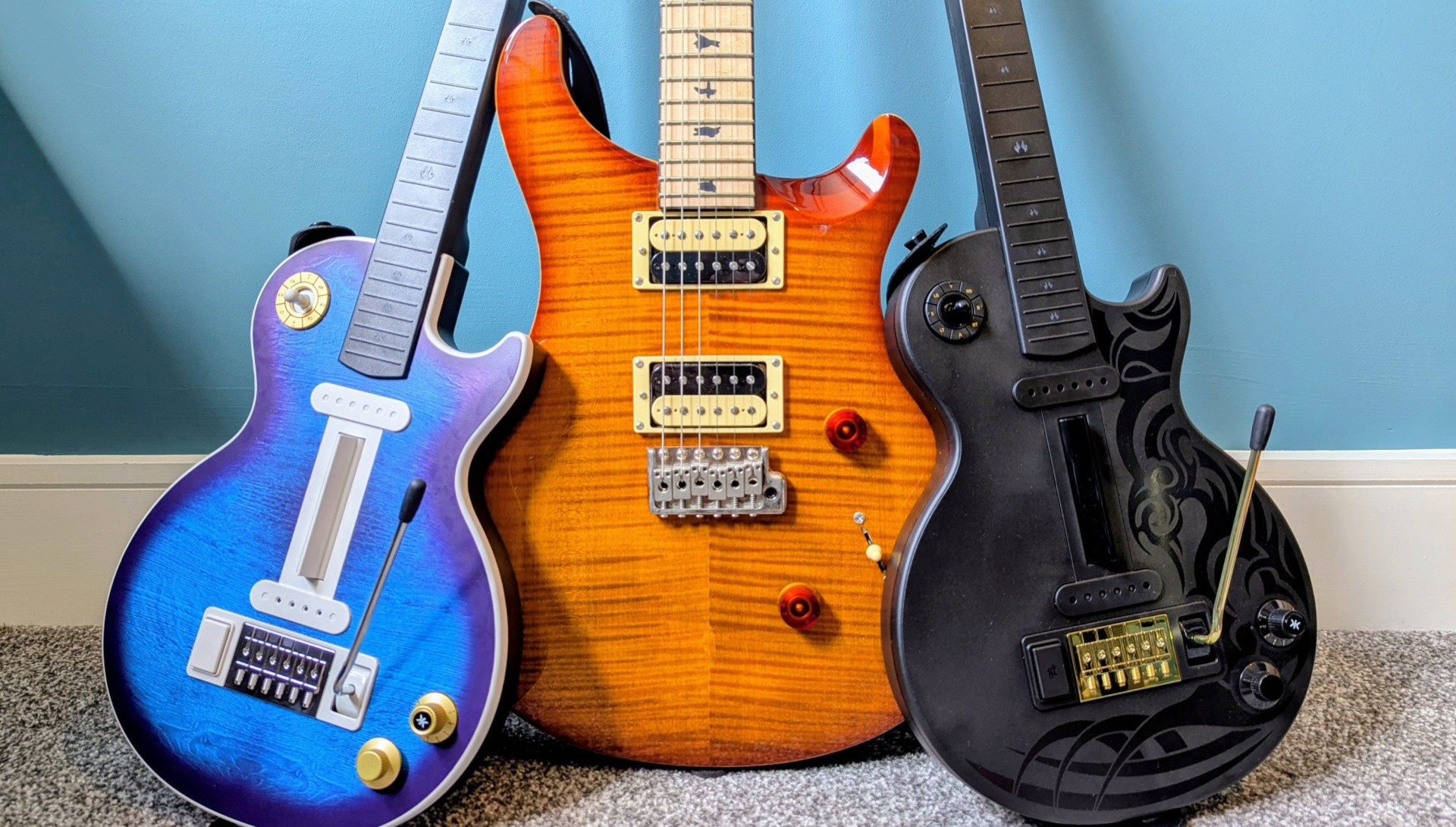
Born via a collaboration between CRKD and Gibson, the guitars come in two flavours: the Tribal Encore Edition and the Blueberry Burst Pro Edition. Priced at £109.99 / $114.99 and £119.99 / $124.99 respectively, both variants are also available as an officially licensed Xbox product – add an extra tenner onto each price for that one if you're in Microsoft's ecosystem.
Subscribe to Nintendo Life on YouTube844k
The obvious difference between the two is the colour design, and the Blueberry Burst Pro Edition looks really lovely. It’s modelled directly off Gibson’s Les Paul with the Blueberry Burst finish, though CRKD has opted not to include a white scratch plate here. Some folks like scratch plates, some don’t – I happen to dislike them vehemently, so I appreciate its absence. And let’s face it, you really don’t need one for a guitar controller.
In the box, you get the guitar itself along with a black strap, a USB-A to USB-C cable, and a wireless dongle hidden within a small compartment disguised as a pickup above the strum bar. The guitar itself comes with the neck detached from the body, so you simply need to line it up and slide it into place until it clicks. You can just as easily remove it by holding a button on the back of the neck and pulling it away from the body.
I specifically mention this because CRKD has made it so you can customise your guitar necks. If you want to use the Tribal Encore Edition but prefer the neck from the Blueberry Burst Pro Edition, you can swap them around provided you own an additional neck at £39.99 a pop (there’s also a ‘solo’ neck with five extra fret buttons further down the neck available for pre-order). But what’s the difference? They look the same, right?
Yes, they look the same, but the Blueberry Burst Pro Edition is priced slightly higher thanks to two key improvements: the mechanical fret buttons in the neck and the Hall Effect strum bar on the body. The fret buttons feel slightly clickier than the standard buttons on the Tribal Encore Edition, while the latter feel slightly more authentic to the guitar controllers you might have used back in the Wii60 days. In terms of actual performance, though, they both function almost identically in practice.
Meanwhile, the strum bar offers zero mechanical feedback on the Blueberry Burst Pro Edition. Instead, CRKD offers up haptic feedback via a small, subtle vibration when the bar is moved in either direction. You can customise this via the CRKD app too, so if you want the vibration to be a bit more intense and noticeable, you can crank it up. The strum bar on the Tribal Encore Edition includes the classic mechanical ‘click’ that you might remember from older guitar controllers.
The default setting on the Blueberry Burst Pro Edition didn't feel nearly satisfying enough for me, but after increasing to its maximum, it felt pretty good. It might be nostalgia talking, but I preferred the mechanical 'click' of the Tribal Encore Edition a bit more. It just gave more noticeable feedback during gameplay, and I think CRKD might need to add even more vibration settings to its app if it wants to bring the Blueberry model up to par.
Sticking with the neck for a moment, both include RGB lighting within the fret position markers. Again, you can customise this within the app, so if you’d rather the lights just stay solid, that’s absolutely fine, but I have to admit, I was quite taken with the multi-coloured ‘wave’ effect. It looks cool!
Looking closer at the body, you’ve got what’s called a ‘navigation hub’ on the upper end, which essentially replicates a pickup selector on a real guitar. Here, though, the nub moves around like an analogue stick, and it’s used for basic menu navigation and for moving your character around in Fortnite Festival.
Surrounding the nub are your basic controller inputs, and honestly, it took me quite a while to get used to the positioning. I got there eventually, but the very nature of having every major input aligned in a circle is bizarre. It’s not a knock against the guitar, mind you; this is probably the best solution that CRKD could have reasonably come up with, but it’s just something to keep in mind.
Replicating the volume and tone controls is another analogue stick — which is essentially the right stick for manipulating the camera angle in-game — and the ‘mode dial’. The latter is particularly interesting and is used to select a pre-determined control setup. It’s best to just list these out before explaining any further, so here we go:
- PC
- Festival - Pro
- Festival - Easy, Medium, Hard
- Festival - Expert
- Programmable
- Programmable
- Programmable
- Programmable
- KEYJAM Mode
Okay, so what the heck is going on? Well, for Switch and Switch 2 owners, you’re going to want to stick with modes 2, 3, and 4, since Fortnite Festival is really the only game available on Nintendo’s console for these guitars.
Mode 2 for ‘Festival - Pro’ unleashes the full potential of the guitar, requiring you to use the strum bar in addition to the fret buttons. This is likely the mode you’re going to want to stick with the majority of the time. Modes 3 and 4 change up the setup ever-so-slightly, removing the use of the strum bar, while adding in that fifth fret for expert mode. Again, though, stick to Mode 2 if you want to get the most out of the guitar.
A quick note before we proceed further: Fortnite Festival is a bloody nightmare. It took me ages to realise that ‘Pro Guitar Mode’ isn’t actually included as a default option in-game. It turns out that it’s hidden within the options menu. You need to head into the Festival settings, tab over to the Gear menu, and select ‘Always Display Pro Parts’. Now you can use Mode 2 on the guitar as intended. Ridiculous.
Back to the mode dial. You can use Mode 1 if you’re playing on PC (and by the way, the guitars also support community jaunts like YARG and Clone Hero), while Mode 9 lets you go back to the PS3 and play all those classic Guitar Hero and Rock Band titles. No Wii support, though, unfortunately. Otherwise, those empty ‘programmable’ modes are essentially CRKD’s way of future-proofing the guitars, allowing for more custom setups should any new major titles launch.
There are just a few more inputs to check out. Next to the strum bar, you’ll also find a rather large ‘CTRL’ button. This is used for activating the ‘Overdrive’ power-up in Fortnite Festival, and it’s positioned nicely so all you need to do is press your palm against it while strumming. Holding it down for around eight seconds or so also syncs the guitar with the CRKD app for customisation. If you're not into pressing a button to activate 'Overdrive', then you'll be pleased to know that gyro functionality is also included, so you can tilt the guitar up for activation.
Down on the bottom, where the strap attaches to the body, you’ve also got a platform slider, which is essential for hooking the controller up to either PC, Android, Switch, or PS3. On the other side, you’ve got the Capture button, Start, and Select. Like the navigation hub, it’s quite tricky learning which button is which here, particularly if you want to quickly capture a moment in-game.
So the guitar’s pretty feature-packed and, thankfully, a joy to play, whether you’re rocking out with the Hall Effect strum bar on the Blueberry Burst Pro, or the standard mechanical bar on the Tribal Encore, and actually connecting it to the Switch and/or Switch 2 is painless. You can either sync it up wirelessly via Bluetooth, plug in the wireless adapter, or simply use the USB cable for wired play.
Naturally, the latter two options are designed to reduce latency, but in my experience, even the standard Bluetooth connection felt pretty spot on. To give Fortnite Festival credit, it does include a calibration option in-game, so you can test this out with each connection method.
One last thing to note is that all of the buttons on the guitar are essentially just mimicking the standard inputs from a controller; even the strum bar is basically 'L' one way and 'R' the other. What this means, then, is that you can use the guitar for almost any Switch or Switch 2 game – whether you should is another story, mind you. I actually won a Street Fighter 6 match with the guitar, and while it was a horrible experience, it does actually work. So if you fancy giving Dark Souls a go with the CRKD guitar, then go for it.
Conclusion
Both CRKD guitars are utterly stunning. These are truly fantastic, feature-rich controllers that work incredibly well with the Switch 1 and 2. Some of the buttons are a little awkwardly positioned — particularly the navigation hub — but this is a minor concern. The features that truly matter, like the strum bar, fret buttons, and general feel of the guitar, are absolutely spot on, and you'll be rocking out like it's 2007 all over again.
Ultimately, though, is it really worth spending more than £100 on a guitar just for Fortnite Festival? Well, that's a question you'll have to ask yourself. If the answer is 'yes', then you can be safe in the knowledge that this is unquestionably the best way to play. And if you've also got a PS3 and a bunch of Guitar Hero or Rock Band titles gathering dust, or you simply want to check out the likes of Clone Hero on PC, then this is a no-brainer.
The samples used in this review was supplied by CRKD.
Please note that some external links on this page are affiliate links, which means if you click them and make a purchase we may receive a small percentage of the sale. Please read our FTC Disclosure for more information.


Comments 34
Ill be grabbing one of these for clone hero. My 6 button Guitar Hero Live Guitars are all nearly dead at this point (build quality of those is bad, but i do love the 2 rows of 3 button layout, so its gonna be a re-learning curve).
this is actually so cool, especially since they dont make guitar controllers often anymore. winning a match with street fighter sounds amazing haha! we do need more rhythm games, rhythm heaven better come out soon!
Thanks for the review, hope those going for any of these will enjoy them - if there were more games using guitar controllers on Switch 1 and 2 I'd consider going for one myself, too bad that isn't the case (how I wish not only those, but also Dance Dance Revolution etc. were back)!
I’d like a guitar hero or rock band like game to come out with plug and play technology right into the tv. No more need to be tied to a console. Add a subscription or dlc set up for future updates/releases.
Upon reflection, it’s a shame they couldn’t get a game on the switch 1 though as now the switch 2 BC functionality would have kept it going for 8-10 years I bet.
@JohnnyMind
I think there will be a chance for Dance Dance Revolution gameplay back on modern console.
I said "gameplay", not the entire DDR franchise.
From what I found from latest trailer of Outright Games, there will be Bratz: Rhythm and Style on multi platform including Switch 1 & PS5 with Rhythm games gameplay and guess what?
The Bratz girls were dancing on Dance Dance Revolution Arcade machine.
Here is the trailer.
Wow ... is this product placement? I didn't bother reading the whole review, just the intro and conclusion, so maybe this is mentioned somewhere. An accessory that can only be used with one game... I wonder.
In any ways, I love rythm games and would be curious which games I can play with this ... as long as the input lag is not as bad as it was with all these accessories back in the day.
@Yalloo
Yeah, you didnt read it, it works with switch, PC, even PS3, and there are separate xbox versions too.
@Anti-Matter Unfortunately based on the trailer it doesn't seem to have the actual gameplay of DDR like Dancing Stage: Mario Mix etc. used to have back in the day (you could play those also with a controller and while that would be better than nothing just like for Game Boy Advance games and so on at the time of course I was referring to games using an actual dance pad since the topic of this article is similar additional controllers) - regardless, hope you enjoy that upcoming Bratz game!
@neil9000 I get it, so it's compatible with more games, just not on Switch. Thanks!
This is 100% confirmed to work with GH games on PS3?? If so, I'm 100% interested.
Although - it may just be cheaper to buy a couple dongles off ebay. I have my Les PAul's, just not the dongles.
Nice, it's certainly expensive, but hopefully anyone who wants one can afford it!
lol I don't have a system (that I play rock band on) this is compatible with. Welp my 360 and wii controllers still work.
What a weird product to release far too late.
Very glad I have a Les Paul and dongle. YARG and Clone Hero are much more fun than Fortnite MTXtival.
@AG_Awesome have you tried rocksmith+?
I kinda want one. All my ps2 and ps3 guitars are still in my parents attic, and they probably still work… I have my ps3 copies of rock band 1,2, and 3 still, and guitar hero Aerosmith, world tour, Metallica, and smash hits. Is it time to get re addicted to the genre? I was obsessed in high school. When rock band let you migrate the songs of the previous game and all dlc to the later games was amazing I had such a huge catalogue of songs it was great. Simpler times
Q: why would they need a Gibson license to make a Les Paul copy with (offensively "wrong" from a guitar player's POV) strat style pickups, bridge, and knobs?
A: they don't. these are generic guitar features that have been "unofficially" copied (often much better) time and time again without license.
the only "collaboration" that CRKD needed from Gibson was negotiating a fee that would allow them to use Gibson's trademarked headstock and logo designs. If there were any deeper collaboration from Gibson, the first thing they'd say is "the pickups should be humbuckers or P90s, and that's not what our vibratos or bridges are like." (as a guitarist himself, the writer knows very well that this is an issue with this product, yet only mentions a scratch plate as the sum difference aesthetically.)
TLDR the Gibson license is misguided, pointless, extremely poorly executed, and is definitely at least a large fraction of the inflated prices of these (which is alluded to in the headline, but then cheekily interpolated into a PRO ffs by the end 🙄)
Wow, please give me rhythm games again, all of them I jived well with Donkey Konga, even the platformer game for the bongos too, Gitaroo Man was fantastic and I'd pay crazy money for a Switch 2 version, I got 2 Dance Dance Revolution dance mats somewhere, lost in a recent move, and the list goes on. Fortnite Festival: not on my radar before this! 😁
@Yalloo
"Wow ... is this product placement?"
it doesn't only work with one game, but it is only designed for one game on a Nintendo platform, and this is a NintendoLife review.
I agree with you that this review is really fishy, regardless. 👍 [edit - I meant what I said but I might've gone too far in my open speculations, here, given my lack of concrete evidence. so I cut the last bit.✌️]
@The_Nintend_Pedant The pro regarding price is a cheeky joke referencing the absurd cost of a real Gibson guitar. Not quite sure it landed with you.
As for your "fishy" remark... Yeah, you're in full-on 'tin foil hat mode' there.
@Olliemar28
"The pro regarding price is a cheeky joke referencing the absurd cost of a real Gibson guitar"
I got the joke, haha. 👍
"As for your "fishy" remark... Yeah, you're in full-on 'tin foil hat mode' there."
I'm the second user to raise the question, and we've both been here years. I'd be careful dismissing legitimate concerns of bias and pay-for-play when we know full well that it's a problem in our industry.
OTOH, "If you don't like it, don't read it," right?
@The_Nintend_Pedant Is it a problem?! I dunno man... Even if it is, it's not with us.
I would absolutely be interested in picking one of these up if Switch 2 had a new guitar game. It is absolutely WILD that Activision killed this genre as hard as they did. Such incompetence, in my opinion.
@Olliemar28
"Is it a problem?!"
I can't tell if this is a good faith question or an odd gaslight, but yes it's a problem. it's been part of the conversation in games as far back as I can remember, which is a pretty long time these days.
thanks for taking the time 👍
Okay what’s up with the picture of a PRS with these
Seriously though, what games can be played on this, Switch and S2 don't even have guitar hero
wtf is this
(word limit)
Nothing wrong with the review but I'm surprised it doesn't talk more about the issue that only one game uses it.
Still, it's a cool idea and seemingly great for Clone Hero on PC. Would love to see more rhythm games on the switch.
@Slideaway1983 I have not. I looked it up though and it seems more music sim/teaching app than arcade style game but didn’t have time to really research it. Is that what it is or am I mistaken? It may be too much for me at the moment if it’s a teaching app. I actually started teaching myself the piano a few years ago with Pianote and playground sessions and already do 30-60 min a night with it. Hahaha
Sooooo.... no drum controller?
There's this one game I've been meaning to take seriously called GalMetal, but the control scheme feels borked unless you magically have a drum controller that never existed. It's either crummy motion controls, or buttons that don't feel like drums
@Anti-Matter You really think that's going to revive the rhythm game genre? if a game wants to have a chance at doing so, 1st it has to not be a licensed game, because that will limit the potential audience.
Winning at Street Fighter 6 with a guitar? Reminds me of those fishing rod controllers that you could play the original SoulCalibur with (and they worked with a tennis game, too)...
I have a Logitech Wooden Stratocaster Guitar Controller from back in the Wii days and it's simply a fantastic piece of hardware.
I would absolutely buy this controller, too. But... if I only knew a game that I can play with this. Never heard of this Fortnite thingy mentioned above and it doesn't even has a review (on this site at least).
Not sure if you've been living under a rock, but this guitar has so much negative criticism outside of what you see content creators and reviews say.
I'll post a brief list of issues everyone is reporting:
Those issues would be forgivable... except CRKD support is so bad, you need to do 20 emails just to get an RMA and actually get a working guitar.
Overall, this feels more like a $50 dollar guitar. It isn't what was advertised to us. For the price, you can get a custom guitar that is much better.
Show Comments
Leave A Comment
Hold on there, you need to login to post a comment...