
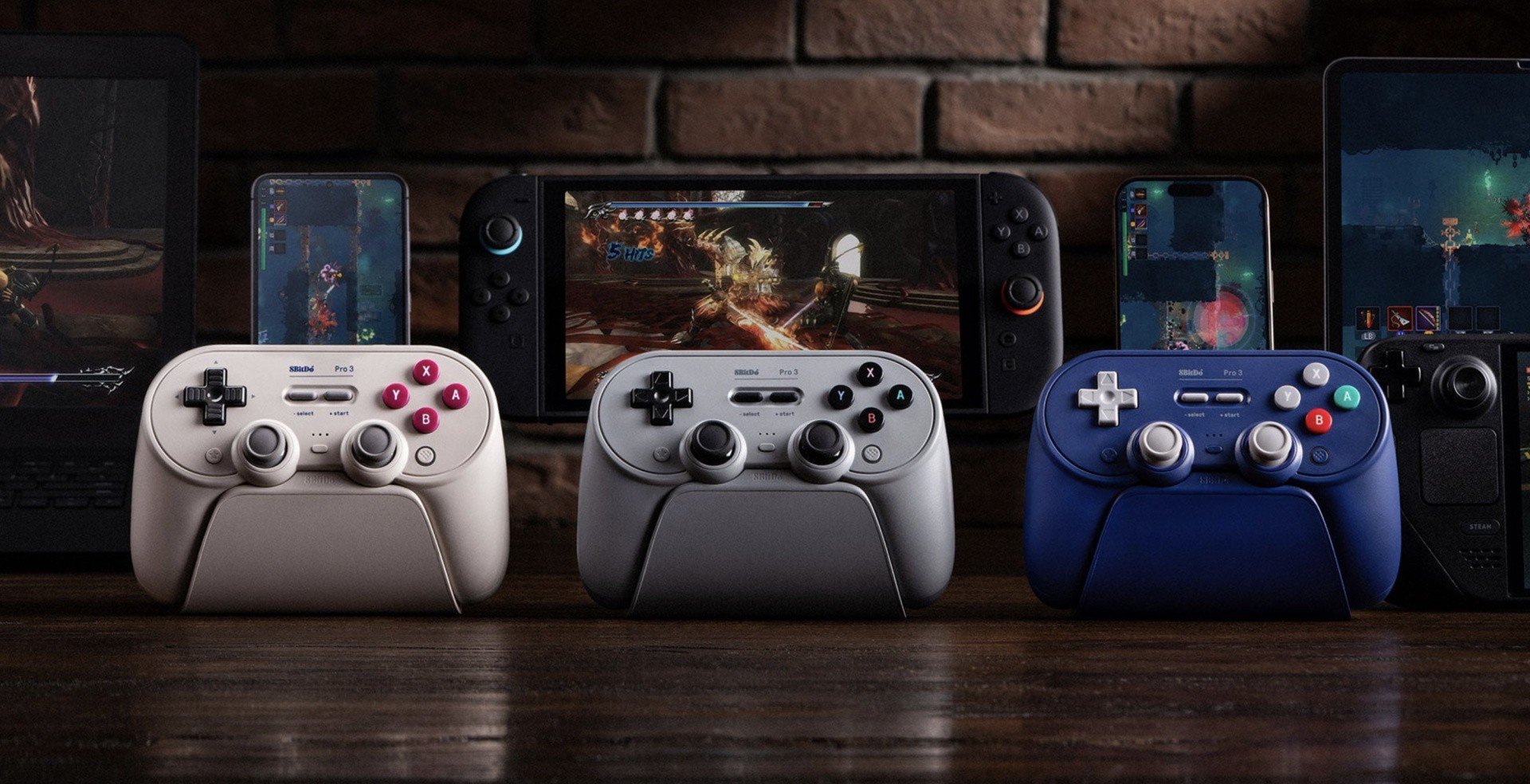
8BitDo, a company that arguably makes some of the finest third-party controllers for the Switch, has announced its new 'Pro 3' model.
Compatible with Switch 1 and Switch 2, it looks pretty familiar to the Pro 2 – why fix what isn't broken 'n' all that – but comes with a wealth of features that will hopefully justify the $69.99 price tag.
First up, we've got swappable ABXY buttons, so if you're keen to remap inputs for certain titles, then this should prove pretty useful. The Pro 3 also comes with its own charging dock, TMR analogue sticks, L4 and R4 bumpers, two back paddles, rumble support, gyro support, and hall effect triggers. Wowza!
It's currently available for pre-order via the official website and Amazon, with shipping estimated to begin on 12th August 2025.
Here's a look at all features for the Pro 3:
- TMR Joystick
- Extra bumpers (R4 and L4)
- 2 Pro back paddle buttons
- Trigger mode switch
- Hall effect triggers
- Tactile D-pad
- Swappable magnetic ABXY buttons
- 6-axis motion control (for Switch and Steam only)
- Turbo function
- Vibration
- Support 8BitDo Ultimate Software V2
Please note that some external links on this page are affiliate links, which means if you click them and make a purchase we may receive a small percentage of the sale. Please read our FTC Disclosure for more information.
What are your thoughts on 8BitDo's new Pro 3 controller? Do you think you'll be picking one up? Let us know with a comment.


Comments 45
I’ve always loved 8bitdos controllers and was looking at the pro2 myself.
I'm not really sure what the need for the magnetic face buttons is, the placement of the buttons and the software mapping is far more important than the printed labels.
This seems like a side-grade to the Pro 2 with an added gimmick and I'm not sure of the value here. Like, does it really need a charging dock? USB-C cables have been prolific and you're very likely to have a few ready for charging your phones or other devices.
Oh, if it has true Switch 2 connectivity, rather than a Switch 1 mode, that would mean it would be recognised as a Switch 2 Pro Controller, and therefore allow you to map the back paddle buttons. That would be truly worthwhile.
Will it have Switch 2 wake up?
So is this better, worse, or equal to an actual switch 2 pro controller?
I love the Pro 2 and SN30 Pro, and I think I'll stick with those. Reason being, they have Bluetooth for both Windows and Switch.
For some weird reason their new Ultimate controllers and this Pro 3, only have 2.4g on Windows.
So for me who plays on PC and Switch in equal measure, the Pro 2 is better.
For people buying it exclusively for Switch 1/2, the GC colour is appealing, but might as well buy one of their other controllers for half the price
Personally, I'll most likely just get a Switch 2 Pro Controller at some point (and also GameCube one, but that's besides the point) as that's guaranteed to have all the features that interest me - that said, hope those going for this will enjoy it!
@Raffles
Oh, the lack of Bluetooth support for Windows is a deal breaker for me. I regular use my Pro 2 as either a Windows X-Input controller, or as a Switch 1 controller for Switch 1 / 2.
my pro2 keeps disconnecting from my pc for no reason
and it doesn't wake up the switch.
I'll wait for the reviews
How is the Dpad? Improved?
Not big on their dpads at all. If that's improved I may finally bite. Otherwise the only 8bitdo in my house will continue to be the pretty okay PCE 2.4G.
I wish they would just leave the labels off the buttons, I'm not new 👍
OTOH when I play with other people I'm sometimes surprised by how often they look at their controller so ✌️
The GameCube nod is appreciated, but why do these companies always forget to put some "c stick yellow" on there? It's so prominent on the controller 🤔
PS - I have the 1st gen of this controller (which I still like better than these with the added whiz) and it's fine but the sticks are so small! IDK why they all spec tiny travel size pads now, even Nintendo.
(It's not like we didn't have the tech to make smaller bits of rubber in the PSX or cube days, why the change? 🤔 Anyway try an old dual shock controller sometime and witness perfection in an analogue stick)
I appreciate the swappable buttons. Once you're familiar with a game, you don't need to look, but if you swap between systems a lot, and are frequently trying new games, it really helps.
I don't really find the Pro controllers (8BitDo Pro that is) that comfy though, and I'm going to stick with the Ultimates.
@RupeeClock Exactly the same for me with my SN30 Pro and Pro 2. Why do you think they've stopped Windows Bluetooth support with their newest controllers?
I'm a huge fan of 8Bitdo controllers generally - solid d-pads, sticks, build quality, comfort etc. But the best bit about them is arguably how versatile they are.
My pro 2 has serious disconnection issues with both my s1 and s2. Which sucks because I bought it for my switch. Still works fine on my PC for the rare game I play with controller on PC...
It's embarrassing that a 3rd party makes better controllers than the company making the console especially when that company is nintendo.
Finally, the ultimate answer for PC and Switch gamers.
Swap B and A, X and Y depending where you play and the confusion finally ends.
Rock on! I can put one of those on my next paycheck! No damage to the payments for my hotels!
Hard pass due to the Playstation analog stick placement. :::sigh:::: Why couldn't they make one with the Nintendo stick positions?
One of these companies needs to make a GameCube controller with Analog Controls for the N$2
I hope some form of easily swappable buttons becomes a standard feature for 8bitdo. I have friends and family who don't play much / as many consoles as I have, and their buttons matching on-screen prompts is a rather big deal for them when I hand them a controller.
8bitdo's controllers have been my go-to multi-platform controllers for years.
So without analog triggers, Hall Effect triggers just mean they last really long basically? I was going to say I don't think I've ever heard of a shoulder trigger breaking but actually I think an old cheapo Gamecube controller I had did once
Sorry my thumbs hate that configuration. Look cool though.
I miss the days when 8Bitdo controllers had a Super Famicom/ Euro SNES, color scheme.
Don't get me wrong, that's all very cool and I do love 8Bitdo's pads (currently using their adapter to use my Wii U pro pad on Switch 2, Yakuza 0 felt a little dicey on the joycons.) but their prices sure have been creeping up and up over the years. I used to recommend their pads as "almost as good as official pads but much cheaper"
I will never buy a PlayStation style controller again in my life. That's not where the sticks belong.
@abe_hikura The prices on everything are charging up, not creeping. Greed has us in the beginnings of hyper inflation here in the darkest timeline.
@RupeeClock Most Steam games don't have a way to swap the button labels in the menu, and automatically recognize 8bitdo controllers as Xbox controllers. So when you're playing it with a Nintendo style button label, the game flips A/B and X/Y in the menus and HUD. After awhile, you can get used to it, but it's confusing in the heat of the moment.
Swappable buttons?! Hall affect?! Comes with it's own charging dock?! What witchcraft is this?! Honestly, this sounds really cool!
@Maulbert
Eventually, you'll get used to remembering the directions of the face buttons rather than the labels.
There's also that since PC games typically use the Xbox Layout, and X-Input controllers observe that layout, A is the South button and X is the west button.
It becomes easy enough to remember that Nintendo and Xbox swap their positions for A/B and X/Y, as the East/South and North/West buttons specifically.
I appreciate it when game developers map inputs based on positions rather than labels, but yeah there's the ongoing problem that Accept and Cancel has to be on A and B, and the Nintendo standard of Accept on East, Cancel on South, is ingrained on me. Frustratingly I've seen some software refer to this button swap as "retro", when really it's more like Eastern and Western.
Looks nice, but what I'd really like are third party Joy-Con replacements. Particularly, I'm waiting for Hori to update its Split Pad Pro for the Switch 2. Much better for handheld play than the stock Joy-Cons.
"Extra bumpers (R4 and L4)"
L4 and R4? Where are they located?
Oh.
I’m likely going to get this controller someday but for now I’ll wait for reviews. 8bitdo never lets down!
I wish though they went full way and included the 3.5mm audio jack support. My Nintendo Pro 2 controller is already showing some drift after 200 hours of replaying MH Rise/Sunbreak, I trust the old and new 8BitDo will be better at drifts since my old Pro 2 seem it'll stay drift free even after 3 years. 😅
@NatiaAdamo Nintendo was coming out with the NSO NES and SNES Controllers at the time, and more or less told 8BitDo to stop infringing on their official colors. There is a reason why we haven't seen those color schemes in years. Until the Pro 3 however, you could swap the buttons if you opened up your controller, replace them with whichever SNES/SF buttons you bought online because they kept the same button shape and pegs. I would be shocked if they didn't end up selling the SF buttons on their website considering these are magnetic.
@Debo626 The Ultimate 2 has almost if not all of the same features announced with the Pro 3, in the Nintendo/Xbox stick layout. Check that one out.
@RupeeClock The controller likely will connect to Windows with Bluetooth, but be in D-Input or Switch Input mode instead of X-Input. Steam natively supports 8BitDo controllers now though, so there will definitely be ways of using this on a Windows PC.
I’ve used 8bitdo for years last year I had 1 controller die and the customer service treated me really bad and added all these hurdles to replace it. I eventually gave up and threw the controller away
I'll probably stick to my trusty old King Kong Pro 2 controller for now. Sure it doesn't wake the Switch 2 up, but to not have to spend another new controller cost I can live with that, plus it also functions with literally any other device that has bluetooth too.
@RupeeClock other platforms for button prompts......... this is actually a huge help especially for steam users.
@RupeeClock While I agree with you about the magnetic button tops and the charging dock, I've seen enough people make a fuss about face button layouts and liking changeable labels(like some arcade sticks), so I'm not surprised people like this. Also, I've seen the charging dock for their Ultimate controllers be well received, so I'm not surprised about that either. 8bitdo probably got a lot of feedback on those two things. I've basically gotten used to all the layouts and can adjust on the fly. I think it's better that way.
Since it came up in a few posts above, I'll share my experiences about the D-pads. I have the original Pro+ controller which is the first of this line and layout. It's the same shape and configuration, but doesn't have the back paddles which is the main difference. The D-pad on that one is one of the best I have ever used in terms of function. I say this as someone who had a Saturn when it was current and consider the Saturn D-pad the best first-party D-pad of all time. In fact, when I started using the 8bitdo Pro+, which I got mostly for the analog and to have a full-featured controller, I was using Saturn pads regularly. The Pro+ D-pad was its equal, and that's despite it being a cross pad, but the D-pad shape isn't as important as the implementation. There is a big downside to the 8bitdo. The button membranes are weak and tear after a while. They are not hard to replace and the replacements are not expensive from what I have seen. I do not have the Pro 2, but it used a different membrane. I don't know how the D-pad compares to the Pro + in function or durability.
I also tried their Ultimate C wired controllers, which have always been a crazy value. I assume the rest of the Ultimate controllers are similar, if not better. The C1 has a stiffer D-pad than the Pro +. It wasn't bad, but required a very different touch. I had to slide my thumb to the edges more than I typically would. So I would consider it a step down. When I finally tried the C2, I immediately noticed the D-pad had a different feel, and was an improvement. In game, it feels just like the Pro +, so I consider the C2 equal with the Pro + and Saturn controller in overall usage(accuracy, responsiveness, feel). I can't vouch for the durability of those as I haven't used them as heavily.
I'm vehemently against the ability to change the button labels. Microsoft should be perennial punished for not following the standard Nintendo set!
Oh .. no more removable battery ??? So stupid !!
It'd be cool if they had little scrollers where those R4/L4 buttons are.
@Nua Cheers! I'll definitely look into that! 😁
@SinisterWright I'm disappointed no third party company has a 3.5mm headphone jack so far (along with rear buttons of course). I know it's still early but I fear Nintendo isn't allowing that on purpose (I hope I am wrong).
It's annoying me lol because I find the Pro Controller 2 overly expensive and too slippery (I returned it). I'll have to buy it again maybe, on sale, since I don't feel it should cost that much. Anyways, was interested in this but no 3.5mm port, no buy since I have no need for another controller without it for the Switch 2.
I'm sure we'll see something soon, hopefully, unless Nintendo has this part locked down for third-party licensed controllers?
E.g., I have a GameSir G7 HE for my Xbox Series X and it's a superb controller (wired but awesome).
Show Comments
Leave A Comment
Hold on there, you need to login to post a comment...