 by
by 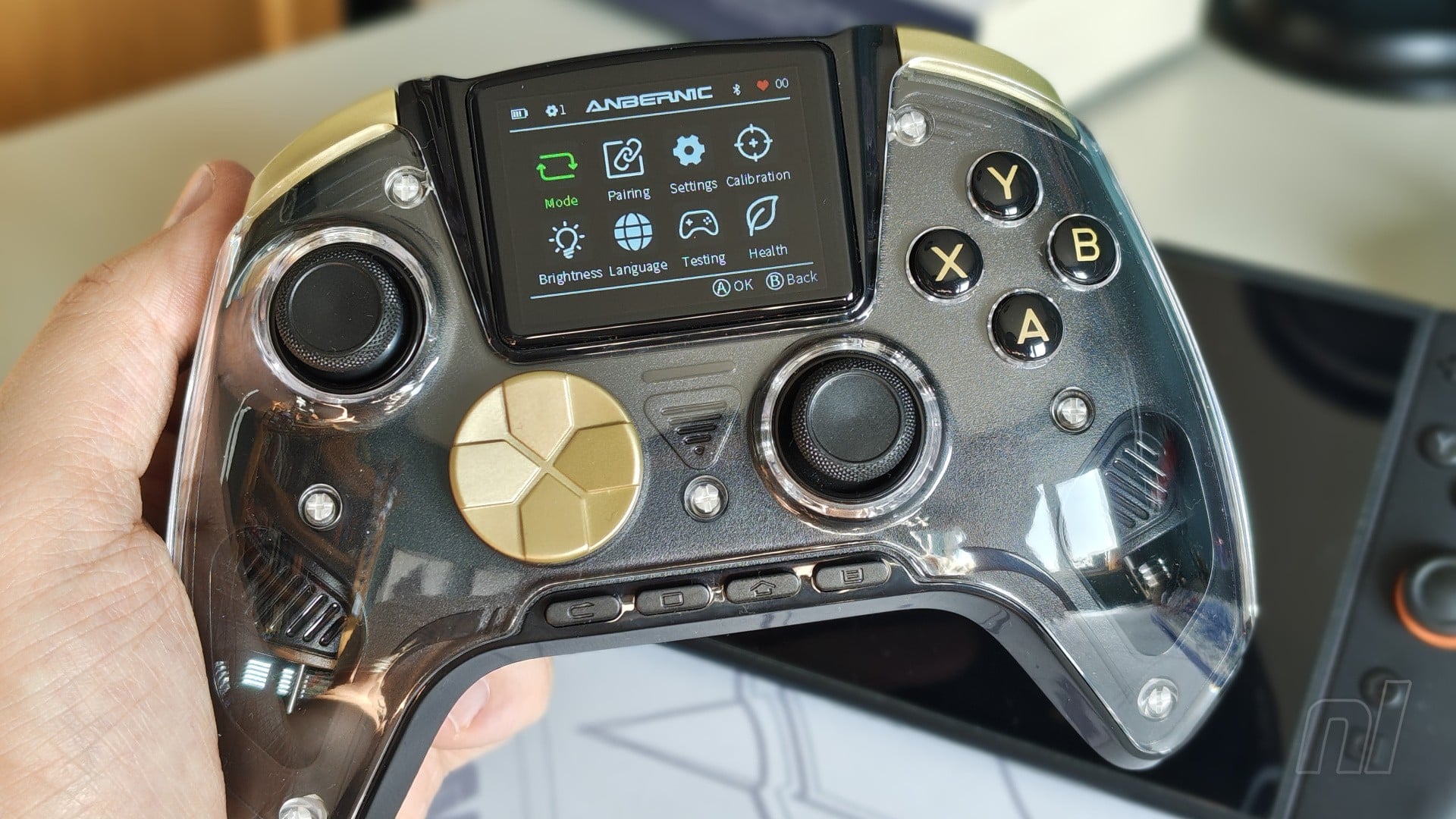
Accessory manufacturer Anbernic is perhaps best known for its work in the retro handheld space, pumping out new emulation devices at a rate I’ve frankly struggled to keep up with. Rarely does it branch out into the realm of controllers, but when it does, it’s safe to say that the results are about as mixed as you can get.
Its first controller, the RG P01, has been described by some as a knock-off of 8BitDo’s budget-friendly pads, and it’s easy to see why. With the new RG G01, however, no one can make the claim that Anbernic has been copying 8BitDo’s homework (though Manba might have a few words to say). But is it actually any good? Well… it’s fine, it’s functional, but it’s perhaps not the controller I’d immediately recommend if you’re after something new for your Switch or Switch 2.
Priced at $39.99, the RG G01 includes two key features that you perhaps wouldn’t expect to see in an accessory at this price point: an IPS screen and a heart-rate monitor. In addition, you’ve got microswitch face buttons and D-pad, Hall Effect triggers, six-axis gyro controls, basic rumble motors, and capacitive analogue sticks said to eliminate potential drift while being more power efficient than either Hall Effect or TMR alternatives.
That last part sounds particularly interesting, and yes, while capacitive joysticks are the new kid in town, the actual feel of the sticks on the G01 are a little lacking compared to the likes of the official Pro Controller 2 and Mobapd Chitu2 HD. They’re certainly responsive enough, but the metallic shaft hits the plastic exterior when moved to the edge, meaning you constantly get material grinding against eachother. This was the norm for a long time, but in 2026 when you’ve got companies putting out impossibly smooth analogue sticks, it doesn’t feel up to snuff anymore.
The ABXY face buttons follow the Xbox layout, and unfortunately you can’t physically swap these out to emulate the Switch's layout. Thankfully, the built-in screen makes it really easy to remap whatever inputs you wish, so as long as you’re okay not looking down at your controller while you’re playing, you shouldn’t be too bothered about the mismatched input labels.
What I couldn’t quite get over, however, was the size of the face buttons – they’re tiny. Not egregiously small like those found on the PS Vita, but they’re perhaps only a fraction larger than official Joy-Con 2. When you’ve got Nintendo’s own Pro Controller offering up huge, comfortable face buttons, it’s really quite hard to transition to something a lot smaller and compact.
Down at the bottom, you’ve got your function buttons, and like the PowerA Advantage controller, these are all laid out in a line – yuck. From left to right, you’ve got ‘Select’, ‘Capture’, ‘Home’, and ‘Start’. Holding down the ‘Home’ button for a few seconds also grants access to the built-in settings via the IPS screen. It’s not touch sensitive, so navigation is handled via the D-pad. Here, you can fiddle around with all sorts of settings like button mapping, pairing modes, calibration, and more. What’s really puzzling, however, is the heart-rate monitor.
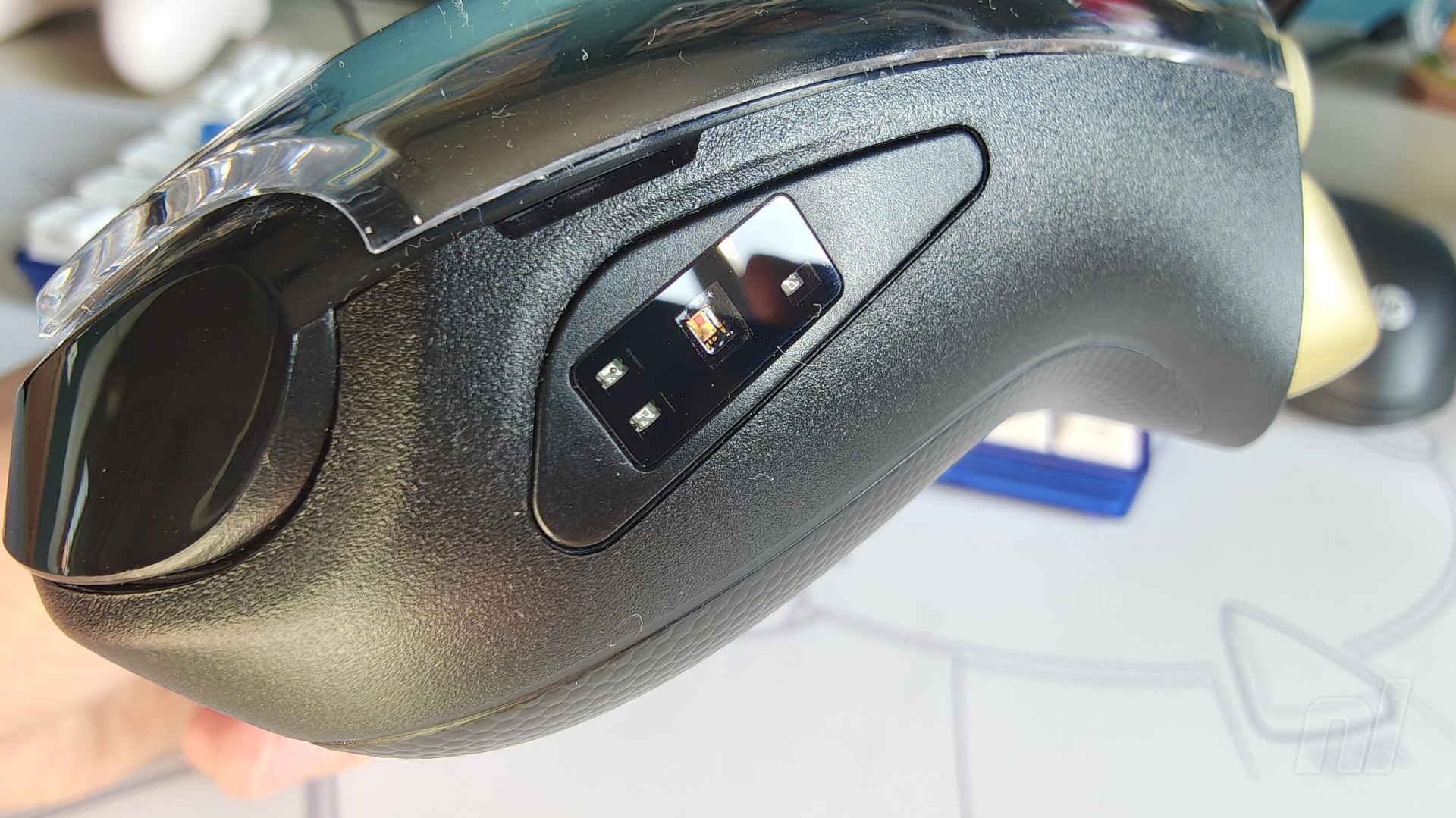
At the top right of the screen, you can keep track of your heart rate via a small real-time indicator. The actual sensor is located on the right grip of the controller, so it’s taking the data from the palm of your right hand. For a while I thought it just wasn’t working at all, but then I realised that a thin film was stuck to the sensor, so it needed peeling off for it to function properly. Be careful with that.
Even though it works perfectly, I can’t fathom why the G01 has a heart-rate sensor in the first place. Its function is to essentially fire off an alarm if it detects your heart rate exceeding a certain threshold (which you can alter in the settings, if you wish, and this is in the form of a continuous rumble from the built-in motors. Is it for health purposes? Is it to see how much you’re enjoying your game? Honestly, it feels like the most superfluous addition to a controller I’ve ever seen, and I’d be happy if this is a one-off.
Battery life clocks in at around 20 hours during normal gameplay, which is pretty good, while the G01 also boasts four additional inputs on the back for remapping and macro functions. Key functionality is sadly missing, however, like wake-up support for the Switch 2, a dedicated chat button, NFC, and HD rumble. The motors feel fine, but feedback is going to be pretty basic no matter what game you’re playing – I will admit though, it’s pretty cool that you can actually see them from the outside of the pad.
Finally, the controller itself contains a removable plastic faceplate, and it’s absolutely vile. I don’t like glossy finishes on any controller, but the clear faceplate makes the whole thing look and feel really cheap. Removing it isn’t really a good option either, as it means the rumble motors are completely exposed to human touch, which sounds like a hazard I’m not exactly willing to test out.
Conclusion
It's important to remember with the RG G01 that its likely aimed toward PC and Android users first and foremost, so while it's perfectly functional as a Switch controller, it's not built with Nintendo's system in mind. So you're not getting the ABXY buttons in the correct layout, and nor are you getting key Switch 2 functionality like a chat button and wake-up support.
Even with that in mind, the G01 is a really weird controller and I'm not really sure who it's for. The heart rate functionality feels superfluous at best, while the clear plastic faceplate makes the whole thing look and feel much cheaper than it's already-affordable price. You could do worse, but there are also much, much better options out there.
The samples used in this review was provided by Anbernic.


Comments 26
It looks kinda tacky
Anbernic, who make the best D-pads of any of the Chinese emulation handhelds, put the most embarrassingly awful shield D-pad on their flagship controller. They don't half make some funny decisions those guys.
the heart rate monitor is for when you suddenly start doing jump squats in the middle of rpg battles, many times has it happened.
What's the point of the screen?
Pass. For my pc gaming, I use a Xbox controller if I’m not using keyboard/mouse. I have no complaints with that ever. Still haven’t purchased a switch 2 pro controller yet, but will when my original ones need replacement.
This is the weirdest controller we've seen reviewed here on Nintendo Life so far - definitely not interested in it myself, but I still hope those who are (or somehow genuinely need it for the heart-rate sensor even though I seriously doubt it) will enjoy it!
Those buttons look crusty af...
This... will run Doom. Very soon
It's so overdone, I kinda like it lol.
I would had bought this if it use the Nintendo layout. I don't like the Xbox layout that much. It's either Nintendo or Sony layout for me, I was never a fan of the Xbox or Dreamcast layout. I want my face button letters to be backwards.
Anbernic is a great product to emulate gba,ds and snes roms. Idk about this now lol
kind of odd seeing a controller that is clearly not meant for Nintendo consoles, and also not recommended generally despite the incongruity, being reviewed on here.
EDIT - those look like normal sized buttons, to me.
EDIT 2 - Now that Anbernic has done a (horrible) gamepad, it's time for 8bitdo to design a (fantastic) handheld 🥳
(plz)
It's fun when controllers can work with Switch, but I would never get a controller like this primarily for switch.
Like I have an 8bitdo SN30 Pro, and it works with my switch, but I mostly use it for gaming on my tablet or other devices and it acts as a backup controller for local multiplayer if I run out of joycons or Pro controllers.
Soon as I saw the button layout I skipped reading the review
I do enjoy reading controller reviews on this site… I was fully third party on Switch 1, so that’s what piqued my interest. But the official Pro Controller 2 is just simply the most comfortable, slickest-feeling controller I’ve ever held. It would take a monumental effort to turn my head at this point, and it ain’t gonna be no heart rate monitor 🤣.
A screen for your controller is perfect for the people who think having a smart oven is 'the future'.
@TheWokesterGamer
Ring Fit be like
Why the hell does it have a screen on it? It looks like a madcat's abomination
One of the ugliest controllers I’ve ever seen. Only thing that could top it is if it had RGB lighting.
Yikes. I pity the younger siblings and guests who get saddled with this abomination .
XY and BA are reversed... Wasn't designed for use with Switch 1/2 in mind that much. That small screen...
It's not even viable for Windows users, imo.
Regarding heart rate monitor... games can be stressful. I don't want to have a heart attack while fighting Arch Tempered Ark Veld.
Next the switch 2 dock oven and cooler. 😂🤔
I love it I'll take ten
I don't need a sensor to tell me my heart rate climbs above 100bpm if I take the lead near the end of a knockout tour.
The screen for settings, presets and more I think is fine.
If it could be used for on screen gaming off the Switch, like the HipGear ones for PS2/Xbox/GameCube, I'd be up for that.
We aren't getting dual screen gaming off this but still. I see a point to screens on 3rd party controllers for sure.
I care for other hardware/software use in things though.
The heart rate monitor is a decision for sure. Could be interesting, could be pointless. I mean Tetris for N64 that had heart rate peripheral feature.
We getting the vitality sensor for Switch 2 the Wii never gave us?
I think it can have a place for sure for people who know how to use it well for different purposes. I think it has a place. Just because everyone else wants a generic 3rd party controller or to write 3rd party controllers off for being too plain, too experimental, too not the 1st party one, or not cheap enough or any other valid or excuses. I think this controller is fair, it's more of interest to me for some use cases. Not going to buy one but still is my kind of thing.
The cons for NFC, wake up and HD Rumble, I mean, some things I'd assume are Nintendo locked, or too expensive so I don't see much point in conning those. That's just a preference or an opinion, not a valid con I see really.
The Xbox layout yeah that is an odd one.
Non touch screen is fine, but navigation buttons/stick or something else or more clear way to access the screen settings/features to not have to use home held down or otherwise and d-pad to navigate would be nice but oh well.
Design looks fine to me. The plastic if it isn't good, yeah I can see reason in that.
The under triggers I mean if they are usable or feel fair enough.
Show Comments
Leave A Comment
Hold on there, you need to login to post a comment...