
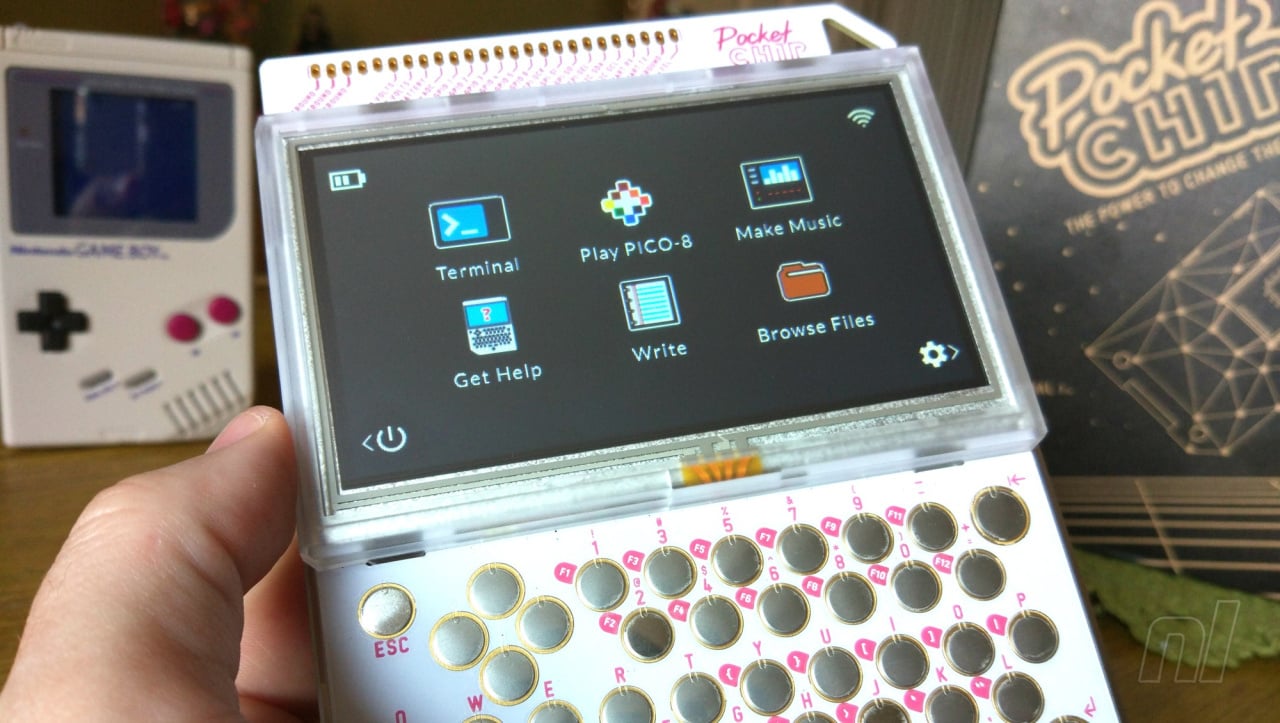
When we initially reported on the PocketCHIP back in May we perhaps got a little carried away in comparing this cheap and cheerful Linux-based handheld with Nintendo's classic Game Boy. On paper at least the system hits many of the same notes - low price, commonly-available tech used in a new way and adorable pixel-based games - but the focus with PocketCHIP is very different. This isn't a device which is likely to sell millions of units worldwide and find itself in every major department store all over the world; PocketCHIP is unashamedly aimed at bedroom coders and tech enthusiasts and despite the initial similarities between it and Gunpei Yokoi's legendary handheld, it beats a very different drum.
A history lesson is perhaps in order before we charge headlong into the review. Before PocketCHIP there was CHIP, a Raspberry Pi-style mini computer which costs $9. CHIP is powered by a 1GHz processor, has 512MB of RAM and 4GB of storage, comes with WiFi and Bluetooth for connectivity and also features a 3.5mm audio jack (which offers video-out, too) and a full-size USB port. Given how compact and powerful this little unit is, it's easy to see where the idea for a self-contained handheld variant came from. PocketCHIP takes the CHIP computer and places it inside a chunky plastic casing complete with a 4.3-inch resistive touchscreen display, full QWERTY keyboard and 3000mAh rechargeable battery - all for $69. The only thing missing is a speaker for sound; you have to rely on the aforementioned headphone socket instead. Remarkably, you can - if you so wish - detach the CHIP module and use it as normal, as the unit is entirely modular.
Despite its name, PocketCHIP is unlikely to slip elegantly into anything but a bag. It's quite a large unit - bigger even than the 1989 "brick" Game Boy - and is quite thick. It's still pretty portable, but seems to look a lot bigger in the flesh than it does in videos or photos. The plastic casing feels sturdy enough, although the bezel which surrounds the screen rattles quite a bit. At the top of the console you'll find GPIO pin breakouts for electrical projects, which we have to admit is a little more serious than we're ever likely to get with our unit. The QWERTY keyboard is protected by a thin layer of plastic (rather like a screen protector) and each key emits a rather loud click when pressed. From a purely aesthetic standpoint it's hard to label the PocketCHIP as utterly desirable, but when you consider its "thrown together" modular origins, it actually looks a lot better than it has any right to, and is sure to appeal to coders and hackers - surely its target audience.
PocketCHIP runs a full version of Linux but strips away the traditional mouse-and-keyboard interface for something a little more straightforward. The built-in tutorial does an excellent job of guiding you through the basics, and connecting to your local WiFi network is a breeze. Once you've done this you can load up PICO-8, surely the main reason any self-respecting gamer would want to own this device.
For the uninitiated, PICO-8 is a "fantasy" console, best described as a retro system which never actually made it into production. Aimed at indie developers, it sits somewhere between the Game Boy Color and Game Boy Advance on the technological spectrum, and is home to a wide range of clones, tributes, tech demos, ports and original games. Although it's mainly aimed at PC users, PICO-8 runs like a dream on PocketCHIP and comes pre-installed right out of the box. Given that the system is running Linux it goes without saying that emulation is also an option for gamers - 8-bit systems like the NES and Game Boy are replicated almost perfectly - but we'll focus on PICO-8 here as it's by far the most appealing element of the package.
What makes PICO-8 - and, by extension, the PocketCHIP - so unique is that you can actually code games by combining the two. PICO-8 allows you to create original software and edit existing titles, giving you the ideal excuse to test out that QWERTY keyboard. You can also use Linux to do, well, anything you can do in Linux. Linux command line is incredibly versatile and allows you to really dig deep into the device's functionality but it's almost certainly going to be too obtuse to most users - even those old enough to recall the bad old days of Microsoft DOS. It also has to be said that coding using the PocketCHIP's keyboard and resistive touchscreen isn't easy - connecting a proper keyboard or mouse via USB is a much better option. Despite the unfriendly nature of the command line interface it's amazing how quickly you pick up the basics, and even the most unsavvy of users should - with a little dedication - get the hang of the fundamentals within a day or so.
The PocketCHIP's four-button D-pad is passable, and thankfully most PICO-8 games are designed with just four directions in mind. There are some which require you to push "up" for certain actions - such as jumping in a platformer or accelerating in a driving game - and this can cause issues as it's hard to press the left or right D-pad buttons at the same time. It's also tricky (but not impossible) to hit diagonals for the same reason. While we were able to enjoy a great many games on PocketCHIP (all of which are free to download via PICO-8's online "Splore" store) there were some which were difficult to play using the PocketCHIP's native interface. There is of course the option to use USB or Bluetooth controllers, but the process of connecting these in PICO-8 is painfully difficult and goes against the whole concept of PocketCHIP being a self-contained and portable solution. Given that PocketCHIP is a modular construction it should come as no great shock to learn that a solution to these (admittedly minor) D-pad woes is just a 3D print away, but there's no denying that the "out of the box" experience could be better.
Despite its niggles, we haven't been able to put PocketCHIP down since it arrived. While our programming skills are nonexistent and we dare not venture too deep into the world of Linux command line for fear of breaking something important, this unique device certainly rekindles some of the same feelings we experienced when we first held the original Game Boy back in the early '90s. Like Nintendo's system, PocketCHIP uses cheap and readily-available tech in a new and interesting fashion, and could potentially be stepping-stone for many budding programmers and developers - the platform that gives them the tools to not only get into games development, but to create something truly special and enjoyable. If Gunpei Yokoi were still alive today, we get the feeling that he'd throughly approve of PocketCHIP.
PocketCHIP is available for pre-order now for $69.


Comments 45
Slap a pretty shell over the top and I'm sold.
I'd imagine it would be painfully slow programming on this.
I turned mine into a self-contained Pokemon Go tracker. Use my mobile as a hotspot and I'm off!
https://twitter.com/deKay01/status/764556033096294401
@deKay That's amazing, how did you do that?
@RCMADIAX Nothing, but the system reminds me (and Tom) a lot of the original Game Boy. It has the same spirit, is cheap and uses readily-available tech in a new and interesting manner.
We don't just cover Nintendo stuff on here, as you'll know from our long-running Hardware Classics series (which has featured NEC, SNK and Sega formats) - because we know that our readers have gaming interests outside of the realm of Nintendo.
@SLIGEACH_EIRE It isn't too bad programming on it. Nice for beginners. You can plug in a normal USB keyboard which helps massively.
@SanderEvers Similar to 1st gen Pi.
Ew.... No, thanks.
New 3DS small version looks better than that.
@ImDiggerDan That would certainly help.
@Damo It's slightly involved, but you have to install python, git and pip on it (easier than it sounds) then install this: https://github.com/PokemonGoMap/PokemonGo-Map
and the requirements for it.
Get yourself a new Pokemon Go account, find your Google API key for maps, and plug them into the code to run it. Once running on the PocketCHIP, use the surf browser on the device to point at localhost:5000 and you're away.
@SLIGEACH_EIRE It has Pico-8 pre installed which is incredibly easy to use. Built in Code, sprite, map and sound editors as well as being easy to share with a simple .png based 'cartridge' system. Even if you don't feel like coding, you can take any available game and edit it to your heart's content. Try some games out (you can port them online easily too!) https://morningtoast.itch.io
has some brilliant shooters, even demakes of DS games!
I have played via browser a ridiculous amount of very impressive PICO-8 games for the past year or so. Truly it just proves that limitations bring out the best and ingenuity from developers. This looks like a good alternative for my PICO-8 shenannigans on the go.
@Le_Dook I mean using the keys would be awkward but someone already mentioned that you can plug in a USB keyboard.
Is it worth pointing out that the PocketCHIP is still only available as a PRE-order? If you get excited and order now, be aware it might take a couple of months before arriving.
Production is ramping up quickly at this point, but they still aren't generally available yet. Some people previously didn't realize that, ordered, and then were really disappointed when they heard that it would be September before they get their PocketCHIP...
@ejamer it's right there in the article: "PocketCHIP is available for pre-order now for $69."
@deKay
Yes, but people often don't understand what "preorder" means unless it's really emphasized.
I'm not making this up - there were dozens of people who preordered and then got very upset, to the point where some accused the company of stealing their money and a couple even threatened ridiculous lawsuits, when they found out that a preorder means their stuff wouldn't ship until it was actually produced and available.
CHIP and PocketCHIP units are actively being produced and shipped, but there is a big line of people waiting so there will be a delay between when you order and when you receive the unit. I suspect (although don't know) that anyone perordering now would be waiting until at least late October before getting their stuff - which is ok, but just something worth being aware of.
I remember DOS games. There's a Star Trek point and click that I still haven't finished, but did manage to run in an emulator a couple of months ago, so maybe I will finish it sometime.
iv got one. its alright but im wating till i get a screen protector befor i realy get to useing it properly.. bigest gripe for me is the D-Pad (specialy when playing child of Dusk)
@deKay That's amazing. That might be my next challenge!
@Sakura DOS is home to some of my fondest - and most frustrating - gaming memories.
@ejamer It's actually a bit misleading to say you can pre-order it (even though I did so in the piece) as I placed my order months ago and it arrived this week. Basically there are production delays, but units are out there (even in the hands of people like myself who didn't support the Kickstarter).
@ejamer if someone doesn't know what pre-order means, that's there fault.
Is that Alone in the Dark running in one of those pics?
@Damo Ah, yes, the DOS days! There was one exploration game that was just text, no visuals whatsoever. I think I was too young to appreciate it much, but wouldn't mind giving it a go now.
@masterLEON
Someone basically remade Alone in the Dark for PICO-8, which is (I assume) what that pic shows.
Link to game: http://www.lexaloffle.com/bbs/?tid=3792
Post mortem: http://www.lexaloffle.com/bbs/?tid=3804
This is a pretty awesome bit of coding, so the post mortem is worth reading. PICO-8 is a great little game-making platform, but is intentionally scaled back and limited in what can be done. Getting a (not perfect, but pretty decent) port of Alone in the Dark running is amazing.
@Sakura I remember it taking my dad three days of solid sitting at the keyboard just to get the Gravis Ultrasound sound card to work. When it did, it was like he'd won the lottery!
Something else game-related that might interest people: Roguelike mechanics were pretty popular in gaming recently. Well PocketCHIP is a great way to go back to the roots of that genre!
https://bbs.nextthing.co/t/unnethack-sil-frozen-depths-zangband-slashem-pocketc-h-i-p-the-roguelike-machine/8027
Play Rogue, Nethack, Moria, Angband, Dwarf Fortress (sort of), and more while on the go! In some cases there is fiddling to be done to get them to work, but for anyone who has played those decidedly old-school games it's a cool blast of nostalgia!
I got mine today and it looks great.
I hope, I will learn to make my own game.
Developers also needs, to put more "icons and programs" to direct use (linux commandline isn't for everyone).
The idea's great! The devices is FUGLY!
Have one on the way. Should be fun. Think my son will eat it up.
Damn, cool little machine!
Still waiting on an app to switch between the current UI and the CHIP's XFCE desktop UI. The Open Pandora had this feature, so I'm hoping someone will do the same for PocketCHIP.
@Koapa
You want more icons on the home screen?
https://bbs.nextthing.co/t/new-pocket-home-marshmallow-edition/6579
Bam! More icons on the home screen, and it's easier to customize!
That said, if you dislike using the Linux command line that will definitely limit what you can do on the device. Your point is well taken though.
@AVahne
They are supposed to be merging the images, which means you'll have that type of functionality (I think). But it's probably a few months out.
I'm more excited about getting the graphics drivers to work properly. That should open up a lot of extra power compared to what is on display now.
I'm pretty sure Gunpei Yokoi would NEVER have approved releasing something as ugly as this to mass markets...
I see no spirit of Game Boy either. With a normal shell around it hiding the cpb parts it might perhaps look a bit better, but all in all, this is only interesting for people that like to fiddle with software instead of actually playing games, yet another thing that sets it miles apart from the Game Boy...
And the directional controls sound awful as well. Hardly competent enough for good emulation, which controls are an important part of.
@ejamer
The GPU driver still isn't working? I haven't been on the CHIP boards in a while so I didn't follow the progress on that. Guess the CHIP software is still very much in progress.
Well anyway, another wish of mine is for someone to make a Pandora/Pyra-style case+adapter board with built in keyboard and game controls. It would make the "Pocket" CHIP actually pocketable and perhaps make it much more attractive to general consumers (EDIT: though now that I think about it, such a thing might be expensive unless produced in high quantities). I'm planning to do a bunch of things to my PocketCHIP including the speaker mod, micro SD mod, and printing out a good keyboard/dpad overlay-case-thing to make the PocketCHIP a bit more usable, but a full overhaul of the PocketCHIP would be really welcome.
@AVahne
My PocketCHIP is still en route, so I can't say with certainty... but I have been following the forums and it sounds like graphics drivers and merging the two different OS branches (CHIP vs PocketCHIP) are very much works in progress. Both seem to be high on the list of developer priorities though.
Totally agree there are things that could be improved or added to PocketCHIP - both on the hardware and software side. But considering the price and convenience I'm pretty happy with how things are turning out. Even if this never ends up being more than a niche geek toy, I'm up for that...
Now if only my hardware would actually arrive so I can start using it.
@BinaryFragger Glad to hear that! The way I see it, even the most dedicated Nintendo fan will be interested in developments outside of the world of Nintendo, and the moment I laid eyes on the PocketCHIP it felt to me like a spiritual successor to the Game Boy; while it's obviously very different in a lot of ways, I'm getting the same buzz from the using the machine that I got all those years ago with the original brick.
@ThanosReXXX No, Yokoi would have had the development dollars of either Nintendo or Bandai to work with, and would no doubt have created a more aesthetically pleasing shell with better controls, robust software support and much more besides.
But the fact is, the team behind this project have a fraction of the budget that Yokoi would have been able to work with, and the end result is remarkable all the same - especially for this price.
Yokoi's WonderSwan, his final machine, would eventually get bedroom coding support via the WonderWitch, and PocketCHIP feels like the next step to that. Yokoi was apparently looking for new and exciting ways of gaming on the go before he sadly passed away; having spent time with the console I have a strong suspicion that he would have loved this, I'm sure.
And by the way, you could purchase the PocketCHIP, not program a single thing and still get amazing value for money purely based on the sheer volume of free games available via PICO-8.
@Damo Well, that wasn't put into the mix when creating that byline, methinks. And that was all I was commenting on. In my humble opinion, he would not have approved.
Just because you had a positive experience with this device, doesn't mean that he would have or should have. I think that is just your opinion and you're welcome to it. Mine just differs, is all.
@ThanosReXXX Wasn't in the mix? Isn't it obvious that what these guys are capable of creating and what a massive company like Nintendo is capable of creating are two very different things?
My point is that Yokoi - who loved using tech in new ways and was particularly inventive throughout his entire career - would have approved of the spirit of this device, not what it looks like.
Surely that is obvious?
@Damo That difference is very clear, and that is also why I see nothing Nintendo or Yokoi in this.
And no offense, but again: you think he would approve, I think he wouldn't. It's a difference of opinion and neither of us is going to be swayed to think otherwise, so with all due respect, I'm going to remove myself from this discussion now. Have a good night.
@ejamer Wow, that Alone in the Dark de-make story was pretty cool. With all that optimizing for the hardware, it's like the old days where every kb of memory mattered. And he was targeting 30FPS! I don't remember my old comp ever hitting that with the original game, lol. I might pick one of these up for myself now!
@Damo
For what it's worth, I'm in your corner on the thought that Yokoi would have loved seeing this device come to life. An inexpensive, portable computer that brings gaming (and coding) to many people in an interesting way seems right up his alley. It also introduces the whole "maker" concept in an accessible way for many people because it reduces the extra hardware required - which seems like something he'd appreciate since he seemed to be an shining example of that type of creative spirit.
People are entitled to whatever opinion they want though, and obviously nobody can an official opinion now.
@ejamer
Same, I'm still waiting for mine. It's somewhere up in Illinois apparently.
@ejamer Thanks for the kind words and glad you enjoyed the piece!
Show Comments
Leave A Comment
Hold on there, you need to login to post a comment...