 by
by 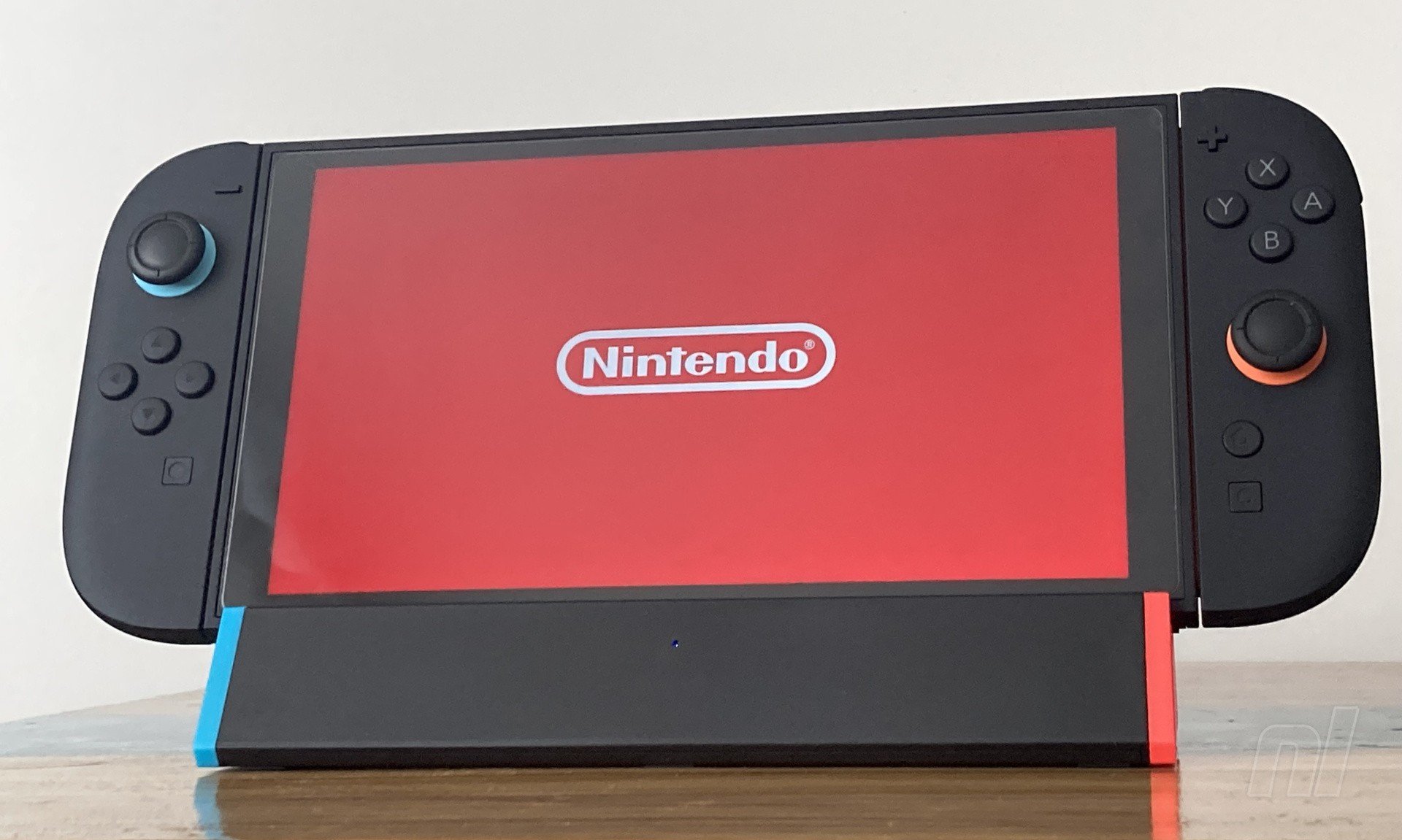
Nintendo's own dock is a non-nonsense device that just works. You slide your console in, crack the Joy-Con off, and boom, you're off to the races. Given the larger size of Switch 2, though, its dock is a substantial slab of black plastic and various third-party firms have stepped in with offerings that are a little more portable.
Antank is one such company, and the S3 MAX TV Dock Station for Nintendo Switch 2 — also known as the SIWIQU Dock Station in some parts — is certainly smaller than the dock that comes with the console. Weighing in at 109 grams (compared to 383 grams), you'll barely notice you're carrying it in your satchel, backpack, or anywhere else you care to secrete your hardware.
Antack sent me the standard model for review, although they have another one that includes an Ethernet port for wired internet connection. Otherwise, on the back of the dock, you get the expected ports: two USB-A slots, a USB-C port for the power, an HDMI port going to your TV, and a button to switch between TV-out and the Switch 2's own display. Beyond the dock itself, in the box you get a little foldout manual with the tiniest text I've ever seen, and that's your lot.
For $35.99 / £28.99, it should come as no surprise that you're not getting Nintendo-level build quality and materials, and the lightness here doesn't help sell the S3 as a premium bit of kit, either. But it's fine; the red and blue end caps match up with the accents around the Joy-Con, and sitting beside your TV, it looks pleasant enough.
You're also not getting an AC power adapter, the requisite cable, or an HDMI cable, and Antack recommends using Nintendo's official gear. If you've got a Switch 2, you'll obviously have that already, but if you're buying this as a cheap dock for a second room, you'll need to factor into your budget another $34.99 / £24.99 for the power adapter, plus an HDMI 2.1 cable (the ultra high speed variety).
Setup is as simple as you'd expect. Connect the cables, turn your TV on, and boom. It works. In fact, I had to reconnect the console a couple of times — apparently a quirk that's been ironed out with a firmware update I've subsequently run according to the instructions on Antack's website — but then it just functioned as advertised.
A little blue LED on the front indicates that everything's powered up. The S3 supports 4K (8K, in fact, according to the blurb, although you won't get that out of your Switch and I've got no way to display 8K content) and up to 120Hz output - although the Switch 2 can only manage 120fps at 1080p, and you'll need a 120Hz+-capable TV, naturally. Several hours of Donkey Kong Bananza, UFO 50, and Drag x Drive delivered image quality on a 55-inch LG OLED that looked indistinguishable from the official dock to my eyes. HDR fired up just as with the standard offering, and everything just worked.
Back to the unit itself, Antank's website blurb mentions a "spring-buffered docking port", although I can't see any evidence of a spring on my unit. The connection at the bottom is totally rigid and fits the console port snugly once you seat the thing correctly, which can take a couple of tries.
Having the system 'unsheathed', you'll definitely note the heat it's pumping out in a way you may not when it's resting in Nintendo's dock. The S3 effectively blocks the console's air intakes along the bottom edge, which gave me pause, but temperature-wise, the fact that the system isn't wrapped in black plastic helps disperse heat from the casing and "provides better cooling than the original charging dock", according to Antank. I don't have the equipment to measure that, unfortunately, and I'd question if the cooling is 'better' than Nintendo's dock, but it seemed roughly the same to me from a volume and temperature perspective.
Switching to handheld mode by hitting the round button on the rear, I noticed the console's fan whirring up more in the summer heat. Given the fact that you can charge via the top USB-C port anyway, I'd prefer to have those intakes uncovered in tabletop mode, personally. Yes, a cable sticking out the top isn't aesthetically pleasing, but I'd rather not tax my still-relatively-new system more than necessary when it's not outputting to the TV. Perhaps I'm being overly cautious, but honestly, I don't see much point in the tabletop button when that's built into the console as-is.
The size reduction is a boon, certainly, but the S3 does come with some minor irritations. Firstly, you'll need to hold the dock down before pulling to remove the console - there's no slide-in/slide-out here. The tight fit means that the S3 doesn't work with third-party cases, either, so you'll need to remove them beforehand. Also, the dock doesn’t seem to communicate with the TV to wake it from standby, if that’s something you’re used to with the standard dock.
While three rubber 'feet' prevent it from slipping, the dock relies on the power and HDMI cables being connected to provide stability and prevent everything toppling backwards at the slightest touch. Obviously, the Switch 2 has its own kickstand, so using the S3 as a makeshift stand doesn't make sense anyway - just be cautious when you're setting things up and don't put your system in the dock until the cables are connected.
And that's it. It's definitely more of a travel accessory in my eyes; if I were in the market for a second dock for the home, I'd probably pay the extra for the slide-in/out convenience (and the necessary cables) of the official option. If you're the kind of person eager to travel as light as possible, or who feels a missed opportunity when playing your Switch 2 in the shadow of a big hotel-room TV, the S3 might be for you, though.
And even factoring in the necessary extras, you're still a fair way off the $124.99 / £92.99 that Nintendo wants for a second dock with those essentials included. For the budget-conscious gamer, then, or travellers who fancy being able to hook up on the fly, it's a good option.
Please note that some external links on this page are affiliate links, which means if you click them and make a purchase we may receive a small percentage of the sale. Please read our FTC Disclosure for more information.
Thanks to Antank for supplying the sample used in this review.


Comments 37
Thanks for the review. I've been eyeing this dock for a bit.
I hope you guys got paid well for this advertisement. 😎
I really wish Nintendo would make a dock like this that let's us see the screen while charging so we could use it as a nightstand clock, calendar, music player, whatever else you can think of. I can understand a little why they covered it up for the Switch, so people didn't think it was a Wii U 2nd screen situation, but after 8 years I think we've figured it out.
Our Switch 2 rarely leaves the dock, and I'm sure about $100 of the price is for screen I can't see, so let me use it. 🤑
Thanks for the review, if I ever need an extra dock (and even more so a portable one) I'll keep this and other third-party ones in mind - regardless, hope those going for it will enjoy it!
does that screen protector have rounded corners? that would annoy me to no end, lol
I got this a couple of days back - and the review hits the nail on the head "a great travel accessory" .
I basically brought this for hotel hopping, and it does the job brilliantly. Worked straight out the box, no firmware updates or messing required.
Barely takes up any space at all, great for just stuffing in the bag with the charger and HMDI (For reference I am using both official charger and official HDMI that came with Switch2)
I use the Tomtoc Sling Crossbody Bag for travel, and now can very comfortably fit in: Switch2 console, Official HDMI Cable, Official Charger, ANTANK Travel Dock, Pro Controller 2
https://www.amazon.co.uk/tomtoc-Crossbody-Protective-Cartridges-Accessories/dp/B0DXZJLY8G/ref=sr_1_1?crid=MB8LK98F0OFO&dib=eyJ2IjoiMSJ9.yMBxpvFejf93PlvvTS0v-WduSzPIHgAn5OQWvyicp8R_nUkt8r_NNr_1hqqyFzL5cAeC5_vDbAiya-jxMMaLLOgBrSVTUEUW1hyxs47BSuOSiOGxbvWfPjPc8lUBVEV8v8L7qKsiAW_0yBg9zY1mZvrPBMPfTe-R_zc1TOkwT8ljpIJ4oupiCqkzwaoQsV6__kScpmko1W-7OdbWNfvQnT4eZEDb36DzyxaDDge43A97HK17WeelX2WaAw-6aa6dKrbIu2bNfjHpcf9S9moIZQ.SpnAQBj0E1dXZslKHuRrPXhCyZfZcV2wnXwJE6DKzpE&dib_tag=se&keywords=tomtoc%2Bsling%2Bswitch%2B2&qid=1755451107&s=electronics&sprefix=tomtoc%2Bsling%2Bswitch%2B2%2Celectronics%2C102&sr=1-1-catcorr&th=1
@CJD87 great item, I was looking for something like that, thank you very much for sharing!
I'm dubious of a Switch 2 Dock that doesn't have an active fan in it. Without that extra cooling the GPU will throttle down and you'll lose performance/fps when it heats up. This is why the official dock has a fan inside.
@Ravenmaster No it isn't. The cooling fan in the dock is to cool the docks chipset, it doesn't cool the console.
So the dock blocks the air intakes of the console but you don't put that in the list of cons? Wow what a great review.
@Arkz have a look at the Switch 2 dock where the console slots into it in the middle. You see those two gaps either side of the usb-c connector? Now have a look at the bottom of the Switch 2 console itself. Those gaps on the dock lineup with the air vents on the console. The fan in the dock blows cool air up into those bottom vents and it gets ejected out of the console’s top vent
@Ravenmaster Those vents in the dock that line up go straight through to the holes in the base. The fan doesn't route air through there. Look at any teardown on youtube. The fan cools the dock chipset. The console fan does all the cooling needed.
I had no issues waking my switch from sleep and it auto turning on my connected display. Maybe try a different hdmi cable or TV.
Wasn't it a major issue with the Switch 1 that third-party docks were bricking systems and people were being advised to stay away from them? Why am I seeing so many promoted now on Switch 2?
@Not_Soos Because not all of them are bricking consoles. I've got a cheap and great third party dock for my Switch 1 years ago that always worked perfectly fine.
So there is a risk of frying your Switch 2 on top of bricking it. Hard pass, especially since the price isn't that great if you need to buy the power supply.
@Ravenmaster Nintendo themselves have said that the dock fans are ONLY for cooling the dock. The console takes care of its own cooling. They even cover this in the Welcome Tour (which I watched on YouTube instead of buying, of course.)
Its to reduce the heat the dock itself generates.
This ill-engineered design clearly went into production solely based on rumored size well before the NSW2 got actually presented since it is blocking the air intakes at the bottom.
Can't recommended this design at all atm.
I fully expect a V2 with bottom air intakes to show up before the end of the year.
@Arkz The things people will do for an affiliate link..
Wasn't this in the 'best' Switch 2 docks 'guide'?
@Jack_Goetz Definitely, that's where I saw and subsequently bought one for second TV, and then another for on the go. Works perfectly fine so far. I wished I could have gotten the LAN version, but it doesn't really seem to exist (yet?), at least it's not actually listed on their website.
@Aeralto
"That’s why shoddy units like this continue to be shipped and that’s why Nintendo Life continues to review them."
I've been assured by staff elsewhere on this site that nothing like this happens in games journalism, so. 👍
@Not_Soos
Alywas surprises me how the Dock bricking stories managed to imprint themselves so hard on the Switch userbase. Switch bricking docks were a thing in the first couple of years for the Switch, 2017 and 2018, when most companies ignored or just guessed the electrical requeriments of the system either to save money or just from plain old naivety. But the alarms, angry customers complaints, bad word of mouth and perhaps some legal issues changed the course of those accesories by 2019, and a new generation of mini docks started to proliferate, in all sizes, prices and forms. Basically from the pandemic onward all new Switch 1 third party docks were safe and useful...even if still not as good as the first party ones, as many will stop working after after a few years of intensive use, but none of them would destroy the system itself.
And now, finding the holy grail in a Switch 2 minidock, and even better, a mini dock compatible with both Switch 1 and 2 is a hot topic among many of us who used third party Switch 1 docks extensively...but still I say some caution is completely justified...after all, we are currently living the first couple of years of the Switch 2.
I think we're long past the point of docks bricking Switches.
I have a similar one to this one, works fine, and while I wouldn't replace the official dock with it next to my TV, for traveling I could see it being really handy.
The fact that “ANTANK” and “SIWIQU” and other brand names in combinations of meaningless capital letters strongly suggest that they are just reselling the same cheap junk.
A portable, quality travel adapter would be very welcome. But this ewaste: No thanks
"The S3 effectively blocks the console's air intakes along the bottom edge, which gave me pause " D:
For anyone who has used these over a longer period of time, how are the thermal/cooling issues?
This dock blocks the air intake...
Also:
This is just 100% false. The Switch (2) has vents at the top of the console that expells heat. And the official dock does not block the air intake.
I would not use this cheap dock with my €500 Switch 2.
Keep reviewing third party peripherals please- it is good to know what else is out there! Make up your own mind whether it is worth buying.
I personally have just bought another official dock for the other TV- bit pricey but worth the piece of mind for me.
I would go for a 3rd party dock if it managed to output 4k/120hz with hardware based VRR. (No idea if that is possible but the Xbox system wide VRR seems much better than Sony’s). I don’t mind if the Maximum frame rate stays at 60fps but the whole thing just seems to work much better on Xbox with that output. Someone who knows more about this than me can probably explain whether it’s possible.
If VRR can be implemented by Mister I don’t see why a 3rd party dock couldn’t.
That (blocked vents) sounds dodgy. Too bad. Does anybody have a list of alternatives?
This looks like a terrible dock. Requires the cables to be connected for stability? Looks like a recipe for damaged cables, or worse damaging the Switch's usb-c port.
@CJD87 not a bad shout actually. I need to look into a cross body. My current one is now too small for my switch 2!!
@zander_dale the TomToc cross body is a class act so far. I’d say actually that most of TT’s peripheral accessories are pretty decent.
The main/official dock is sadly way too big for the bag. However, swapping it out for the Travel Dock means that it comfortably houses the Switch2 console, needed cables (HDMI and Charger) + pro controller 2.
The cross bag is actually now my default storage for all the aforementioned, with the original dock now actually boxed away
4 days in the travel dock is proving really solid. So much less cumbersome to drag around to hotels and set up etc
Not sure I’d recommend if you’re just wanting a ‘spare’ dock for another room at home… but if you’re after a travel option then it’s an easy justification to buy 👍
@CJD87 I have the dock, I bought it for travel a few weeks ago. Very intrigued by the bag now - especially as I’ve just got off a plane! Thanks for the tip!
No ac adapter, no hdmi, no intake, no fan..... guys, just spend the extra dough on a Nintendo one. Don't be cheap, you always pay for it in the end.
Hopefully premium fully featured docks come out soon.
@CJD87 I picked this up, but I'm having a hard time with the latency while playing through this dock. Have you noticed the delay between button pushes and on-screen response? I don't get it when I play with the Nintendo dock. Nobody has mentioned this, so I'm curious if it's the dock, or something else? Just strange it doesn't happen with the Nintendo dock.
@PeterPanana Sorry to hear that but I haven't experienced this at all! Maybe something else? Have you since re-tested the Nintendo dock??
@CJD87 That's good to hear. I will do more testing with it on a different TV, and another comparison with the Nintendo dock to be certain. I'll also check the firmware of the dock and install the latest update from last week.
Thanks!
Show Comments
Leave A Comment
Hold on there, you need to login to post a comment...